
How to Query a Database Using AI: Context and Examples
Query a database with AI using a reusable context brief, an active-user SQL example, checked results and follow-up questions that preserve business meaning.
To query a database using AI, connect an approved data source, explain the business meaning of its fields, ask a specific question, and check the returned answer. A useful assistant needs both schema context (which tables and columns exist) and business context (what terms such as “active user” mean). A query can execute successfully and still answer the wrong question.
This guide takes one question from an ambiguous request to a checked result, then tests two follow-ups. Download the editable context brief and synthetic PostgreSQL reference to adapt the workflow. The worksheet is editorial material, not a built-in product template or automatic import feature.
Updated October 3, 2026. AskYourDatabase publishes this guide. The SQL references were checked locally in PGlite, a PostgreSQL 18.3 WebAssembly runtime; they do not measure an AI model's accuracy or establish results on your database.
Choose how the AI will access the data
An AI query may mean a generated SQL statement, a connected database answer, or a search over documents. Decide which output you need before choosing a tool.
| Workflow | What you provide | What you receive | Check before relying on it |
|---|---|---|---|
| Disconnected SQL drafting | Approved schema excerpt and question | SQL text to run elsewhere | Dialect, missing columns and actual execution results |
| Connected database assistant | Permitted connection, schema and business context | Query results and conversational follow-ups | Execution identity, metric meaning and model data flow |
| Native warehouse agent | Supported warehouse sources and agent context | Answers within that platform | Source scope, warehouse permissions and query costs |
| Document question answering | Text or documents | Retrieved passages or summaries | Whether the answer actually requires live database calculations |
If you are choosing an engine-specific workflow, start with the database query generator and database chooser. For SQL construction, use the AI SQL query generator examples. For the broader concept, see natural language database querying. This article focuses on preparing context and keeping meaning consistent through a conversation.
Current alternatives also expose context controls: DBeaver AI Chat can scope database context, and Google's authored-context guide describes business instructions and schema guidance. These are different product workflows, not evidence that every assistant supports the same controls.
Prepare a reference guide the AI can use
Start with one reporting task and only its relevant tables. A complete database dump is rarely a useful explanation of business meaning. Have the data owner confirm the following fields in your context brief:
| Context | Example for this guide | Mistake it prevents |
|---|---|---|
| Entity and row grain | One user per context_users row; one event per context_events row | Counting events as people |
| Relationship | Many events can belong to one user; join on user_id | Joining on a display label or multiplying rows |
| Activity definition | At least one project_created or report_exported event | Treating a login as meaningful activity |
| Exclusions | Ignore test users and events without a known user | Counting internal tests or anonymous events |
| Reporting time | September 2026 in UTC, start inclusive and end exclusive | Including October or changing the timezone |
| Region meaning | User's current region, not region at event time | Claiming a historical breakdown the schema cannot provide |
| Output | Count distinct users; show zero for known regions without activity | Dropping an inactive region |
A foreign key explains how two tables relate. It does not tell the assistant which actions count as activity. Likewise, a boolean named is_test needs a rule saying whether to exclude it. If the team disagrees about the definition, settle that disagreement before interpreting a generated chart.
Keep definitions short enough to review. Give each metric an owner and review date. Store credentials in the connection configuration, never in a prompt or training example. For a large schema, begin with approved reporting views and document their grain; giving a view a friendly name does not make its joins or access controls correct.
Turn “How many active users?” into an answerable question
The first question is underspecified. It could mean logins, purchases, project creation, or any event. It also omits a period and whether test accounts count. A useful clarification establishes those facts before producing a confident number.
Here is the complete request for our synthetic example:
Count distinct non-test users with at least one project_created or
report_exported event from September 1, 2026 at 00:00 UTC up to, but
not including, October 1, 2026 at 00:00 UTC. Ignore events without a
known user. Return the count and state the filters used.
The sample has five users and eight events. User 1 has two qualifying September events in North. User 2 has only a September login, plus qualifying events just outside the period. User 3 has a qualifying South event exactly at the start. User 4 is a test user. User 5 is in West with no events. One event has no user ID. The expected answer is 2 active users, not three activity events.
Run the reference SQL file in one disposable local PostgreSQL session if you want to reproduce the example. It creates temporary tables and inserts synthetic rows before the three reference queries. Those temporary tables are a local demonstration, not a promise that a separate AI connection can access them. An administrator should prepare a separate authorized test dataset for product evaluation.
SELECT COUNT(DISTINCT u.user_id) AS active_users
FROM context_users AS u
JOIN context_events AS e ON e.user_id = u.user_id
WHERE u.is_test = false
  AND e.event_type IN ('project_created', 'report_exported')
  AND e.occurred_at >= TIMESTAMPTZ '2026-09-01 00:00:00+00'
  AND e.occurred_at < TIMESTAMPTZ '2026-10-01 00:00:00+00';
active_users
2
Inspect the logic, not just whether SQL ran. Replacing COUNT(DISTINCT u.user_id) with COUNT(*) returns 3. Including login events also returns 3, for a different reason. Making the upper time boundary inclusive adds user 2's October event and again returns 3. The same wrong number can hide several different mistakes.
PostgreSQL's aggregate documentation explains the distinction between counting input rows and non-null values. Apply the intended entity count before discussing model quality.
Use follow-up questions without losing the original scope
Next ask: “Break that down by current user region, including regions with no active users.” Retain the activity definition, UTC dates and test-user exclusion. The new grouping should not silently redefine the metric.
SELECT u.region, COUNT(DISTINCT e.user_id) AS active_users
FROM context_users AS u
LEFT JOIN context_events AS e
  ON e.user_id = u.user_id
  AND e.event_type IN ('project_created', 'report_exported')
  AND e.occurred_at >= TIMESTAMPTZ '2026-09-01 00:00:00+00'
  AND e.occurred_at < TIMESTAMPTZ '2026-10-01 00:00:00+00'
WHERE u.is_test = false
GROUP BY u.region
ORDER BY u.region;
region | active_users
North  | 1
South  | 1
West   | 0
The event filters stay in the join condition, so users with no matching event remain available for grouping. Counting distinct event-side user IDs gives West zero instead of counting the left-hand user row. This example includes regions represented by non-test users; an independent region dimension would be needed to show a region with no such users at all.
Then ask: “Now only count report exporters; keep the same period and show zero regions.” Change the event condition to e.event_type = 'report_exported'. Expected results are North 1, South 0, West 0. The download includes the complete query. Record what changed and what stayed fixed; conversational memory is something to check, not assume.
If you ask for “region at the time of activity,” this schema is insufficient. It stores only the user's current region. A responsible next step is to request event-time region data or a historical mapping. A plausible answer invented from the current field would misrepresent the question.
Apply the workflow in AskYourDatabase
AskYourDatabase supports connected analysis across database types including PostgreSQL, MySQL, SQL Server, BigQuery and Snowflake. Pick one permitted connection for the first evaluation. Supporting several connectors does not mean one query can automatically join all of them.
- Prepare a connection. Follow the connection instructions with a database owner. Use a limited reporting identity and an approved sample. The PostgreSQL setup guide covers connection and timezone checks; the MySQL guide covers its own setup and SQL boundaries.
- Add definitions and examples. The training documentation explains documentation and question/SQL examples. Desktop exposes the Train workflow; Website Chatbot has documentation and SQL example configuration. Adapt concise parts of the context brief to the controls in your version.
- Ask the known-answer question. Keep the reference result separate so you can distinguish an actual calculation from repeating an answer placed in context. Review query details through the available product or administrator tools; an embedded end-user response may not expose SQL.
- Check the follow-ups. Verify that adding a grouping or narrowing the event type preserves the other filters. Try a fresh conversation to distinguish reusable documentation from context available only in the current chat.
- Save the approved definition. Update documentation or examples deliberately. A correction in one conversation is not proof of permanent automatic learning or model fine-tuning.
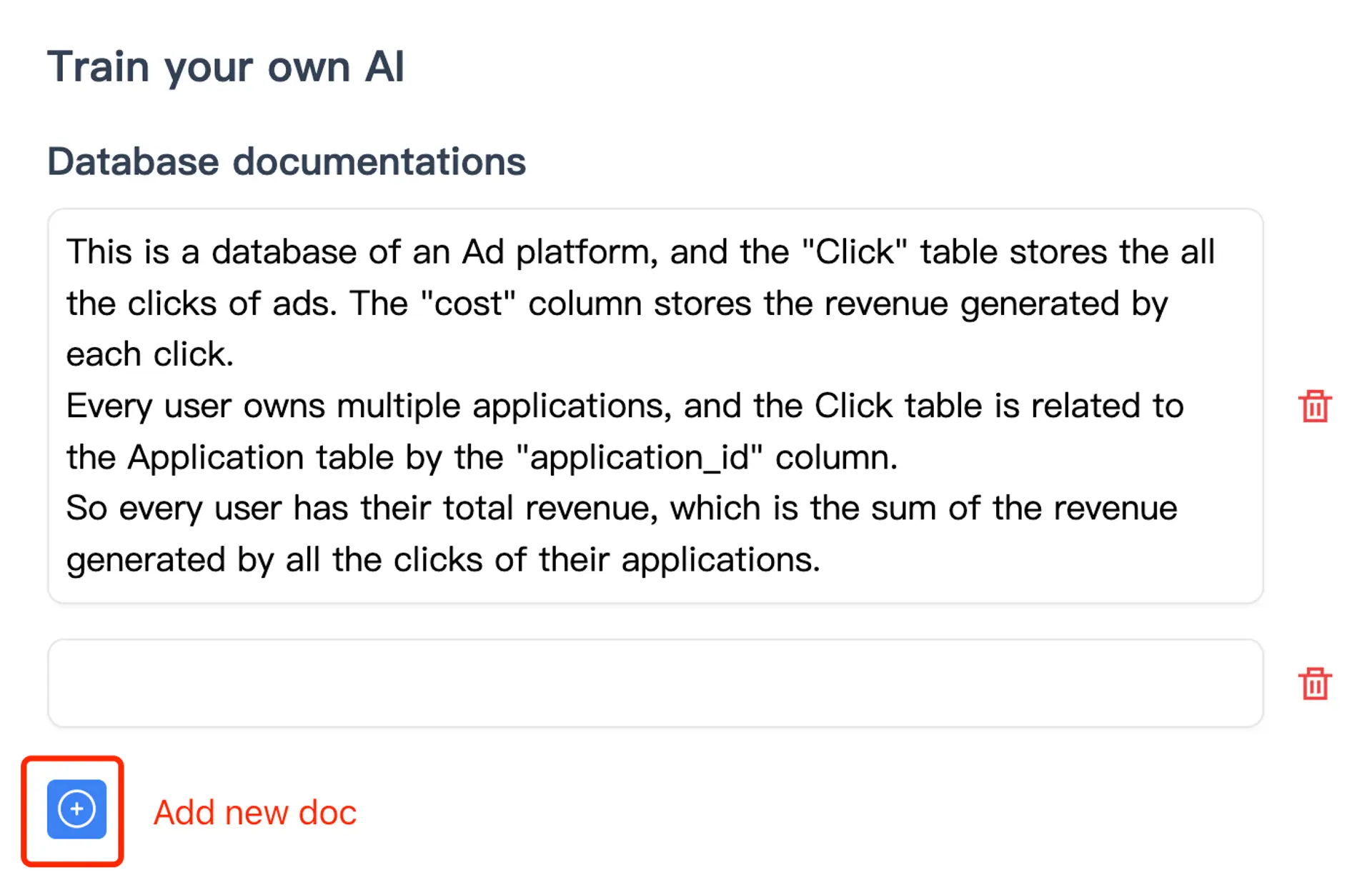
This existing product screenshot illustrates the documentation workflow. It is not a screenshot of the synthetic active-user example or a measured accuracy result. The downloadable worksheet belongs to this article; the product does not automatically populate it for you.
For personal connected analysis, start with Desktop and check the current plans. For a website integration, use the embedded database chatbot guide, which covers a separate application and user-access workflow.
Diagnose a wrong answer before adding more examples
| Symptom | Inspect first | Next action |
|---|---|---|
| SQL fails to execute | Engine, actual column names, types and permissions | Correct the dialect or schema reference; do not grant broad access to hide the error |
| Count is too high | Row grain, duplicate activity and join cardinality | Compare the entity IDs against an independent reference |
| Count is plausible but different | Definition, exclusions, timezone and date boundaries | Restate the approved metric and inspect the applied filters |
| Follow-up changes the total unexpectedly | Which filters were retained or removed | Make the change explicit and rerun the original question |
| Answer uses an unavailable dimension | Whether the field or historical mapping exists | Request the missing data or narrow the question |
| Chart and explanation disagree | Actual returned rows, labels, units and aggregation | Validate the data before changing the visualization |
We checked eight local reference cases, including the base total, both follow-ups, three deliberately wrong queries and two data mutations. Duplicating a qualifying event leaves the distinct-user total at 2; changing the test user to a non-test user raises it to 3. These checks validate the example's logic, not AskYourDatabase's generated answers.
For a repeatable evaluation across more questions, use the text-to-SQL acceptance test kit. Keep held-out questions out of training, record actual failures, and rerun earlier cases after revising context. For a reusable report after the definition is stable, follow the SQL dashboard implementation guide.
Approve the data path before connecting sensitive information
Desktop's local database connection does not imply offline AI processing. Schema, questions and selected results can be included in model requests. Hosted Chatbot and private deployment have different storage and connection paths; read the security and data-flow documentation before choosing one.
Prompt instructions are not access controls. Restrict readable tables and rows using the approved database and application configuration, then test the actual user identity. Read-only credentials can still expose everything they can read and permit expensive queries. Set appropriate operational limits with the database owner. A synthetic result check cannot prove tenant isolation or transport security.
Frequently asked questions
How do I query a database using AI?
Connect a supported database through an approved account, supply the relevant schema and business definitions, then ask a question with a clear period and output. Check the executed query and results through the available product or administrator tools before relying on the answer.
What schema context should I give an AI database assistant?
Provide the relevant tables, row grain, keys, relationships, field meanings and valid codes. Add metric definitions, time zones, units, exclusions and a reviewed question-and-SQL example. Schema names alone rarely define terms such as active user or net revenue.
Can AI explore my database without SQL knowledge?
A connected assistant can help ask follow-up questions and explain results without requiring you to write every query. Database setup, permissions and important result checks still need a qualified owner. Missing data and ambiguous business definitions cannot be solved by fluent wording alone.
Does AskYourDatabase automatically learn every correction?
Do not assume a chat correction becomes permanent shared knowledge. Add approved documentation and SQL examples through the supported training workflow, then check a fresh conversation. These features provide context; they are not a guarantee of model fine-tuning or correct future answers.
Is the downloadable context brief a built-in product template?
No. It is an editable worksheet published with this guide. Review and adapt its fields, then transfer appropriate content into the documentation and SQL example fields supported by your product version. It does not automatically import a schema or configure permissions.
Can one AI question join all my database connections?
Support for several database engines does not establish cross-database federation. Verify the query engine, connection scope and approved data path. Use an authorized reporting layer or an explicitly supported integration when a question requires data from separate systems.