
Updated November 8, 2026
PostgreSQL GUI for questions, results and follow-up analysis
AskYourDatabase is a conversational PostgreSQL interface for people who need answers from existing data. Connect an approved database, ask a business question, inspect the SQL and result, then request a breakdown or visualization. Use this page to choose the right kind of GUI and verify that an answer came from the intended database, schema and role.
Desktop downloads for macOS and Windows. Check the current plan and allowance before evaluating.
Which PostgreSQL interface fits your work?
A GUI can be a server administration console, a SQL editor, a table viewer or a conversation. Decide what you must do after connecting. A support lead investigating a queue needs a different workflow from a DBA restoring a backup.
| Task | Starting point | Decision to verify |
|---|---|---|
| Ask questions and explore answers without drafting every query | AskYourDatabase Desktop | Business definitions, allowed data, result checks and model processing |
| Manage PostgreSQL objects, inspect plans or administer the server | pgAdmin | Required administrative features and a separate privileged operator workflow |
| Edit SQL and inspect data across database engines | A SQL client such as DBeaver | Driver support, editor features, edition and AI-provider configuration |
| Let customers ask questions inside your application | Website Chatbot integration | Authentication, tenant boundaries and server-side connection access |
These categories overlap. The current pgAdmin Query Tool documents an SQL editor, results, explain plans and an AI Assistant. DBeaver AI Chat also supports natural-language database work. Compare the end-to-end task instead of assuming other clients cannot use AI. This is a documentation-based selection guide, not a hands-on benchmark.
For SQL construction and PostgreSQL dialect examples, go to the PostgreSQL query generator. For an exported operational report, use the PostgreSQL report-output guide. This page focuses on choosing and using a connected interface.
Building a query instead of choosing a client? Compare the PostgreSQL AI, visual and code-based query-builder workflows and check the missing-orders example before adapting exclusion filters.
PostgreSQL SQL editor, IDE or AI client: what should you test?
Choose a SQL editor when the statement itself is your working artifact: you need to edit a script, inspect an execution plan or rerun an exact query. Choose a conversational client when the starting point is a business question and you want to explore its answer through follow-ups. An IDE adds a broader development workspace; that label alone does not establish the features you need.
For a shortlist, try one approved question in each candidate with the same database, role and data snapshot. Use these three tasks to make the comparison concrete:
- Locate the intended object. Confirm that the editor tab and object browser refer to the same database and schema. In pgAdmin, open the Query Tool for the selected database. In DBeaver, check the active datasource and schema attached to the SQL editor; selecting an object elsewhere in the navigator is not enough to establish the editor context.
- Run and inspect one bounded result. In a SQL client, review the selected statement and transaction mode before execution. In AskYourDatabase, ask the known-answer question, inspect the generated SQL and compare the result with your reference. Check whether a displayed row limit is a preview rather than the complete population.
- Repeat a small change. Change one filter and reconcile the answer. Record the SQL and definition you need to reproduce it. If your requirement is script versioning, backup or schema changes, evaluate a development or administration workflow separately from conversational analysis.
The pgAdmin Query Tool documentation covers its editor, output and connection status. The DBeaver SQL Editor documentation explains its active datasource and schema controls. Menu names can vary by version. These are documented comparison criteria, not measured speed or accuracy rankings. For the conversational route, continue to the AskYourDatabase evaluation steps below.
Verify the database, role and schema before trusting a result
Two clients can show different answers even when both connections succeed. A saved connection might point to another database, use a reporting replica, select a different schema or execute with a different role. A query against an unqualified table name can resolve differently when the search path changes.
Have a technical reviewer run this diagnostic in an approved test connection, or ask the assistant to show these session values and inspect the executed statement. It reads session information and does not change permissions. Keep the returned environment identifiers out of public screenshots.
SELECT current_database() AS database_name,
       current_user AS effective_role,
       current_schema() AS first_schema,
       current_setting('search_path') AS search_path,
       current_setting('TimeZone') AS session_timezone,
       current_setting('transaction_read_only') AS transaction_read_only;
Check the values against your administrator’s intended database and role. The first schema is not a list of all available schemas. Prefer an approved, schema-qualified object such as reporting.support_tickets in a reference query. PostgreSQL documents these session information functions.
Read-only is not a complete access test. The transaction flag describes the current transaction. It does not prove that the login lacks write privileges, that every later connection uses the same settings, or that sensitive rows are inaccessible. PostgreSQL’s transaction documentation defines that scope. Limit the database role to approved reporting objects, avoid owner/superuser access and test denied operations separately on disposable data. Do not grant broad access simply to make missing tables appear.
| What you see | Check next |
|---|---|
| Connected, but an expected table is absent | Database name, schema qualification, role privileges and the product’s configured table selection |
| A daily total differs from another client | Exact SQL, session time zone, date boundaries, snapshot and replica freshness |
| A query fails with a permission error | Preserve the error and ask the owner to review the intended reporting access; do not label it zero activity |
| The first question works but a follow-up fails | Additional columns or objects used by the follow-up, context definitions and its executed query |
Connected, but a PostgreSQL table is missing?
A successful connection proves that a session opened, not that the intended object is available to that session. Start with the identity query above in the actual client or request path that fails. Then ask a technical reviewer to adapt this read-only catalog check to one approved schema and table. It reads metadata, not business rows, and changes no grants or session settings.
SELECT n.nspname AS schema_name,
       c.relname AS object_name,
       has_schema_privilege(current_user, n.oid, 'USAGE') AS schema_usage,
       has_table_privilege(current_user, c.oid, 'SELECT') AS table_select,
       pg_table_is_visible(c.oid) AS resolves_without_schema
FROM pg_catalog.pg_class AS c
JOIN pg_catalog.pg_namespace AS n ON n.oid = c.relnamespace
WHERE n.nspname = 'reporting'
  AND c.relname = 'support_tickets'
  AND c.relkind IN ('r', 'p', 'v', 'm', 'f');
Download the same object visibility SQL. Replace both string values with the exact stored names; a quoted mixed-case object must keep its case. Avoid treating a name typed in an AI prompt as proof that the object exists.
| Observation | What it establishes | Next check |
|---|---|---|
| No row | No matching supported relation in this database catalog | Confirm the database, exact spelling/case and whether the object is a table or view; do not infer zero business activity |
| schema_usage is false | The current role lacks USAGE on this schema | Have the owner review intended access; table SELECT alone is insufficient |
| table_select is false | No table-level SELECT privilege is reported | Review the approved access model; column-level grants may differ, so this is not a universal denial test |
| Both privileges true, resolves_without_schema false | The relation is not the object selected by an unqualified name in this session | Use the intended schema-qualified name; check search-path order and same-name objects |
| All three true, GUI still omits it | These database metadata checks pass | Check client filters, metadata refresh and configured table selection; then test the approved query |
For example, two schemas can each contain support_tickets. Even with permission on both, an unqualified query selects the first matching object on the search path. Use reporting.support_tickets when that is the agreed source. Visibility is name resolution, not a guarantee of row access: row-level security, view behavior and other execution requirements still apply. See PostgreSQL’s schema and search-path explanation.
The downloadable query was checked locally against synthetic schemas and restricted roles in PGlite. The checks cover a missing object, missing privileges and a same-name object earlier in the search path. They do not test your network, an actual GUI, AskYourDatabase’s model or your production access controls. Keep diagnostic output private and request only the intended reporting access; do not add broad grants to make an error disappear.
Check a result: open tickets with missing estimates
Use a small known-answer question before exploring a large dataset: “For each team, count open tickets, count tickets with an effort estimate and total the known estimated minutes. Keep a missing estimate distinct from zero.” The following five synthetic rows require no application tables and do not represent customer data.
WITH sample(ticket_id, team, status, effort_minutes) AS (
  VALUES (101, 'Support', 'open', 30),
         (102, 'Support', 'open', NULL),
         (103, 'Support', 'closed', 90),
         (104, 'Success', 'open', 20),
         (105, 'Success', 'open', 40)
)
SELECT team,
       COUNT(*) AS open_tickets,
       COUNT(effort_minutes) AS tickets_with_estimates,
       SUM(effort_minutes) AS estimated_minutes
FROM sample
WHERE status = 'open'
GROUP BY team
ORDER BY team;| Team | Open tickets | With estimates | Known minutes |
|---|---|---|---|
| Success | 2 | 2 | 60 |
| Support | 2 | 1 | 30 |
The queue has four open tickets, three estimates and 90 known minutes. The closed ticket’s 90 minutes are excluded. COUNT(effort_minutes) skips the missing estimate, so it cannot stand in for the ticket count. An average across known estimates is 30 minutes; dividing known effort by all four tickets gives 22.5 and answers a different question.
Follow up with “Which team has an open ticket without an estimate?” The expected team is Support. Then try a closed-only filter or an empty filter and check that the answer reflects the changed scope. If every estimate in a group is missing, SUM returns NULL: decide explicitly whether the display should say unknown. Do not quietly turn unknown effort into zero.
This reference and its result controls were executed locally in PostgreSQL-compatible PGlite. They validate the SQL example, not the accuracy of an AI-generated answer, a customer deployment or database security. For a broader evaluation, use the text-to-SQL acceptance kit.
Try the AskYourDatabase PostgreSQL workflow
- Prepare one limited connection. Choose an approved test database or reporting schema and a restricted role. Follow the connection guide for the PostgreSQL URI format. Enter credentials in connection settings, never in the question.
- Open Desktop and select PostgreSQL. Your computer must reach the host through your approved network path. A hosted Website Chatbot connects from its server infrastructure; a working local connection does not establish hosted reachability.
- Add the meaning of the data. Define ticket status values, team ownership and missing-estimate handling in documentation and SQL examples. Include only approved schema and business context.
- Ask, inspect and reconcile. Start with the known-answer question. Compare its SQL, row count and totals before asking a follow-up. For real tables, verify the row grain and join keys with a data owner.
- Visualize the checked result. Ask for a team comparison after the table reconciles. Label the chart as known estimated effort so that missing estimates are not disguised. For recurring widgets and filters, continue to the SQL dashboard guide.
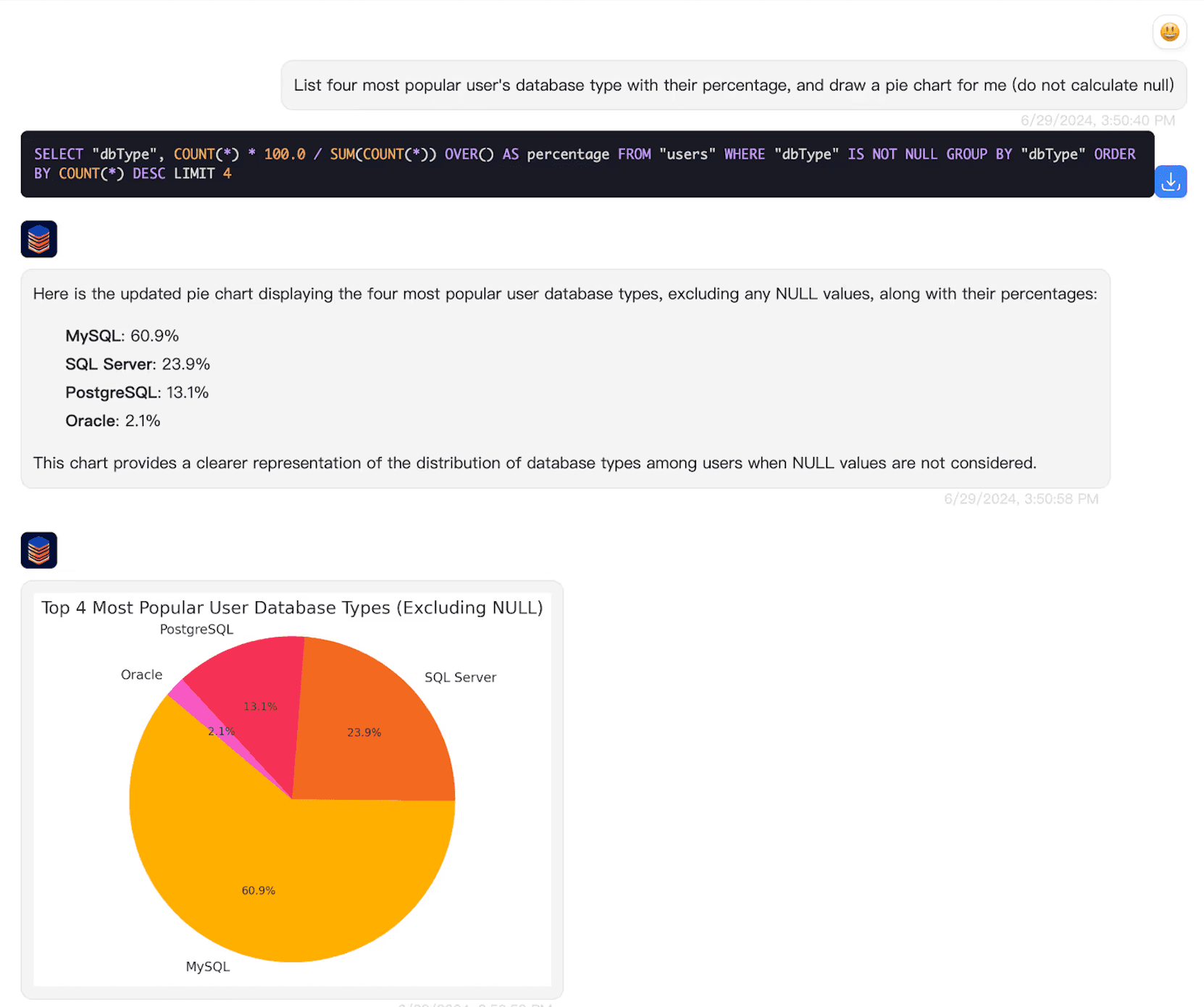
The PostgreSQL setup tutorial adds connection details and a separate time-zone example. Keep a SQL client available when you need to review statements or diagnose permissions. Bulk editing, schema migration, backup and restore require their own reviewed administration workflow.
Choose the data path as well as the GUI
Desktop connects to PostgreSQL from your computer, but AI processing can include questions, schema context and selected result data sent to external providers. A local connection does not establish offline inference or no data movement. Review the security and data-flow guide, including transport verification and history handling.
For a team or customer interface, evaluate the embedded Website Chatbot and its authenticated access design separately. Database row-level security follows the actual database role and session context; a shared login does not automatically identify every viewer. For private hosting or model requirements, use the Enterprise deployment guide and discuss an evaluation.
Start with Desktop for an individual analyst workflow, compare current product plans, and record the question, reference SQL, expected answer and access scope that your pilot must satisfy.
PostgreSQL GUI questions
Why is a PostgreSQL table missing from my GUI?
First verify the active database and role, then the exact schema and object name. Check schema USAGE, table SELECT and search-path resolution separately. A client filter or table selection can hide an otherwise accessible object. An object appearing in a catalog does not prove that its rows are readable, and read permission does not prove that row-level security allows every row.
What is a PostgreSQL GUI?
A PostgreSQL GUI is a graphical client for connecting to Postgres and working with its objects or results. Choose according to the task: database administration, SQL editing or conversational analysis. AskYourDatabase focuses on questions, follow-up analysis and visualization of connected data.
How does AskYourDatabase differ from pgAdmin or DBeaver?
AskYourDatabase centers the workflow on business questions and follow-up analysis. pgAdmin provides PostgreSQL administration and a Query Tool; DBeaver provides database development workflows. Both also document AI features, so compare the actual workflow, access controls and provider configuration rather than assuming AI is exclusive to one product.
Can I use the PostgreSQL GUI on macOS or Windows?
AskYourDatabase Desktop has macOS and Windows downloads. Your computer must be able to reach the PostgreSQL endpoint with a supported connection configuration. The hosted Website Chatbot uses a different connection origin and should be evaluated separately.
Does a read-only setting make the connection safe?
A read-only transaction setting describes the current transaction; it does not prove that an account lacks write privileges or cannot read sensitive rows. Use database privileges limited to approved objects, verify the effective role and test denied operations in a disposable environment. Do not use an owner or superuser for routine analysis.
Why might two PostgreSQL clients show different results?
They may connect to different databases, roles, schemas or replicas, or use different filters, time zones and snapshots. Compare the executed SQL and session settings before changing the prompt. Missing tables or permission errors should not be interpreted as an empty business result.
Can I share the Desktop connection as a customer-facing web GUI?
A Desktop connection is an individual analysis workflow. For customer-facing questions, use a separately configured Website Chatbot integration with authenticated users and tested data access. A shared connection does not automatically inherit each viewer’s database identity.