
Updated October 18, 2026
A MySQL GUI for questions, results and charts
AskYourDatabase lets you explore a connected MySQL database through conversation. Ask a business question, inspect its SQL and results, then request a breakdown or chart. Choose this workflow when you need answers from existing data; use a development or administration client for tasks such as schema design and server maintenance.
Desktop for macOS and Windows. Review the current plan, allowance and connection requirements before starting.
Ready to install? Follow the Mac and Windows installer guide, including checks for a missing download or a file that will not open. Return here once the app launches to evaluate your MySQL workflow.
Which kind of MySQL interface do you need?
A MySQL viewer, visual query builder and AI assistant solve different problems. Start with the action you need after connecting. A business user investigating a daily total needs a clear answer and traceable SQL; a database administrator may need backup, modeling and maintenance tools.
| Your task | Workflow to evaluate | What to verify |
|---|---|---|
| Ask business questions and follow up without drafting each query | AskYourDatabase Desktop | Schema context, generated SQL, answer checks and model data flow |
| Develop SQL, design schemas or administer a server | MySQL Workbench or an administration client | Required server version, operating system and specific administration features |
| Browse or edit rows in a grid; construct joins visually | A table viewer or visual query builder | Editing, transaction review and join-designer capabilities; chat is a different interface |
| Let customers ask questions inside your application | Website Chatbot integration | Authentication, per-user data scope and the hosted connection path |
MySQL's Workbench manual covers development, modeling and administration. Oracle also documents AI assistance in Ask Studio. AI is not exclusive to one interface: compare the workflow and deployment you will actually use. This is a task-selection guide from AskYourDatabase, not a hands-on ranking of competing clients.
For drafting SQL, use the MySQL query generator. For connecting an instance, follow the MySQL chatbot setup guide. This page focuses on choosing an interface and reconciling results across clients.
Explore MySQL with AskYourDatabase
- Connect a focused reporting dataset. Prepare the approved MySQL endpoint, database and a restricted account. Follow the connection instructions. Desktop connects from your computer, so confirm its network route before entering the connection.
- Define the question. Specify the population, date window, reporting time zone and currency. For example: “Count completed orders by day for October 1 through October 7, using UTC. Exclude cancelled orders and keep currencies separate.” Map these terms to your actual schema.
- Add missing business context. Use documentation and verified SQL examples to define statuses, relationships and calculations. An assistant cannot infer which of several date columns represents the report you intend.
- Inspect the SQL and reconcile the answer. Compare a small period with a trusted report. Check row counts and filters before accepting the total. The text-to-SQL evaluation guide provides a broader acceptance process.
- Ask a follow-up, then visualize. Request a regional breakdown or daily chart using the same definition. Recheck the date window and units. A polished chart is useful only if the underlying query answers the intended question.
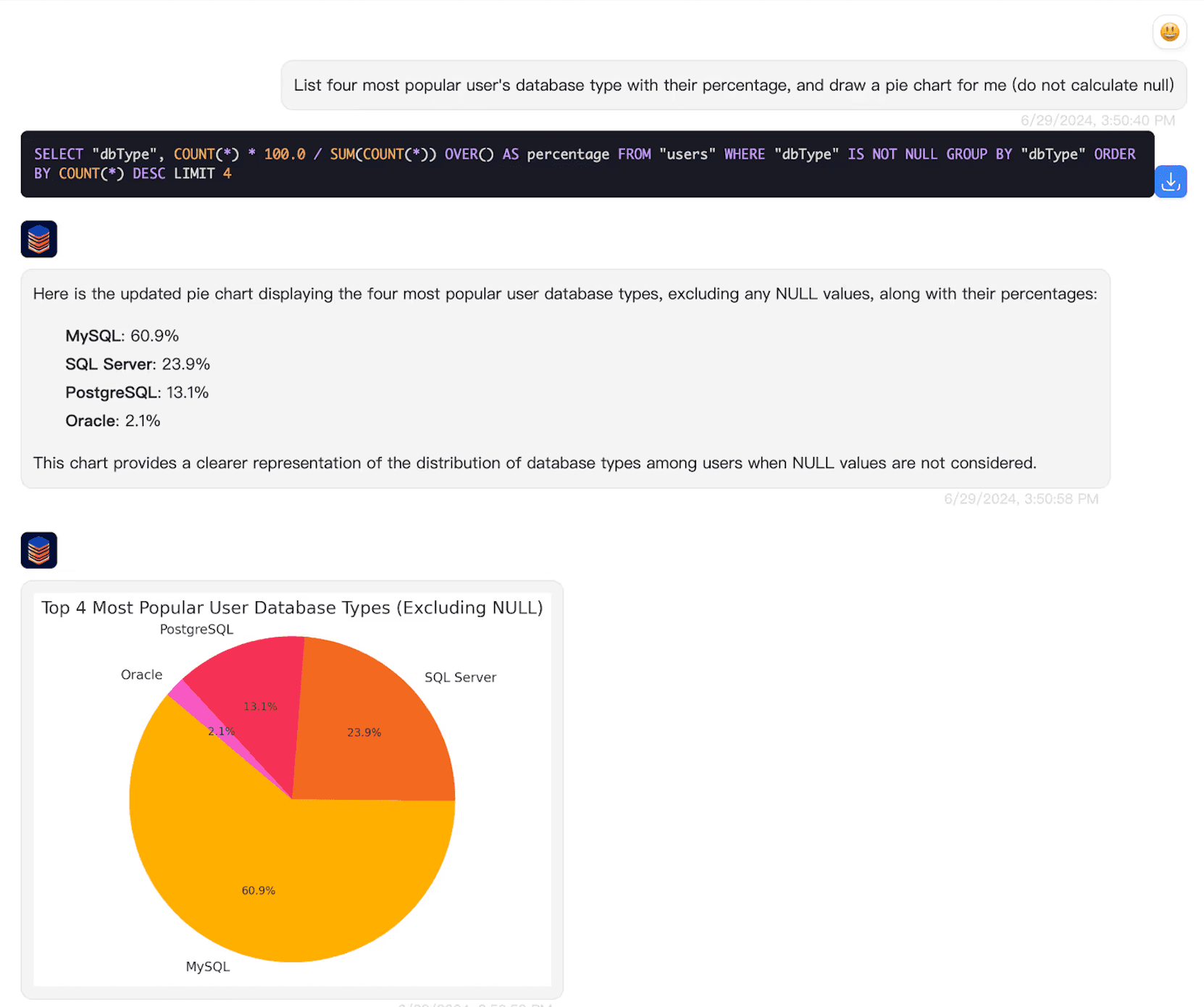
Need a repeatable reporting surface instead of an exploratory conversation? See the SQL dashboard workflow. Keep the approved metric definition consistent between both.
Before comparing results, check the MySQL connection
Two clients can both connect successfully while reading different data. Compare the endpoint and replica, selected database, account, actual SQL and transaction timing. This diagnostic SELECT can help identify session differences in your approved SQL client:
SELECT DATABASE() AS database_name,
       CURRENT_USER() AS matched_account,
       VERSION() AS server_version,
       @@session.time_zone AS session_time_zone,
       @@session.sql_mode AS sql_mode;
DATABASE() can be NULL if no database is selected. CURRENT_USER() identifies the matched MySQL account, not the person viewing an embedded application. SYSTEM as the time zone requires checking the server configuration; it is not a synonym for UTC. These values describe the session running this statement, not every pooled connection or later AI request.
| Symptom | Check before changing the prompt |
|---|---|
| Connection refused or timeout | Endpoint, port, VPN, firewall and whether the connection starts on your computer or a hosted server |
| Access denied or missing table | Matched account, selected database and object privileges; do not treat a permission failure as zero business activity |
| Daily totals disagree | TIMESTAMP versus DATETIME, session and reporting time zones, date boundaries and replica freshness |
| Grouped query fails in one client | Server version and SQL mode, including ONLY_FULL_GROUP_BY; fix ambiguous SQL rather than weakening the mode |
| Rows differ despite identical SQL | Transaction snapshot, replica lag, user access scope and whether the displayed result is truncated |
Use database-enforced read permissions scoped to approved data. A readable table may contain rows a particular viewer must not see. Review security and model data flows; local SQL execution does not mean offline AI or zero external processing.
Why the same MySQL events can appear on different days
Consider two synthetic events worth 40.00 and 60.00 in one example currency, recorded at 23:30 UTC on October 1 and 00:30 UTC on October 2. Both clients can return the same grand total, 100.00, while disagreeing about the daily split.
MySQL converts TIMESTAMP values through the session time zone. With UTC, the events occupy two calendar days. With a +08:00 session, both occupy October 2. A DATETIME column does not automatically make that conversion. These behaviors are described in the MySQL date/time type documentation.
| Session used for DATE(happened_at) | October 1 | October 2 | Grand total |
|---|---|---|---|
| +00:00 | 1 event / 40.00 | 1 event / 60.00 | 2 events / 100.00 |
| +08:00 | No result row | 2 events / 100.00 | 2 events / 100.00 |
The following reference is for one disposable SQL-client session, not a production chat. It creates a temporary table and sets that session's time zone. Temporary tables need the same connection throughout, so do not assume they persist across an application's pooled requests. Open the complete SQL reference.
-- Run in a disposable MySQL database, in ONE SQL client session.
-- Temporary rows only; do not paste setup into an AI production chat.
SET time_zone = '+00:00';
CREATE TEMPORARY TABLE gui_events (
  id INT PRIMARY KEY,
  happened_at TIMESTAMP NOT NULL,
  recorded_at DATETIME NOT NULL,
  amount DECIMAL(10,2)
);
INSERT INTO gui_events VALUES
  (1, '2026-10-01 23:30:00', '2026-10-01 23:30:00', 40.00),
  (2, '2026-10-02 00:30:00', '2026-10-02 00:30:00', 60.00);

SELECT DATE(happened_at) AS report_day,
       COUNT(*) AS events, SUM(amount) AS amount
FROM gui_events
GROUP BY DATE(happened_at)
ORDER BY report_day;

SET time_zone = '+08:00';
-- Run the same SELECT again: both events now fall on October 2.
-- recorded_at stays unchanged because it is DATETIME.
SELECT id, happened_at, recorded_at FROM gui_events ORDER BY id;
-- Close this disposable session when finished.
We checked the example on an isolated MySQL 5.7.24 instance: UTC and +08:00 daily results, unchanged DATETIME values, the UTC date boundary and the unchanged grand total passed five assertions. This is a synthetic SQL check, not an AI accuracy test, a test of your database or a recommendation to deploy that older server version. The linked manual describes MySQL 8.4; rerun the example on your supported version.
For real reporting, have the database owner document the time zone and timestamp storage convention. Do not blindly change server settings. If using named zones with CONVERT_TZ(), verify that the necessary time-zone tables are available; fixed offsets do not model daylight-saving changes. See MySQL's conversion reference. Preserve the reporting definition when moving from a table result to a chart.
Choose the deployment that fits your audience
Start with Desktop for your own analysis and compare plans for current usage allowances. Desktop connects locally, while relevant schema, conversation and result data can reach external AI services. Confirm the configured model path before using sensitive data.
For customers asking questions inside a product, use the embedded analytics option and test authenticated access with representative users. For hosting requirements, review private application and model deployment boundaries and discuss the required configuration. Neither a shared database connection nor read-only access automatically enforces customer isolation.
MySQL GUI questions
What is a MySQL GUI?
A MySQL GUI is a graphical client that connects to a MySQL server. Some clients focus on SQL development and administration; AskYourDatabase focuses on natural-language questions, query results and follow-up analysis. Installing a GUI does not create or host your MySQL database.
Is AskYourDatabase a replacement for MySQL Workbench?
Choose by task. MySQL Workbench documents SQL development, modeling and administration tools. AskYourDatabase provides a conversational analysis workflow. Keep the tools you need for backups, schema changes and server operations; do not assume that a chat interface has equivalent administration features.
Can I use the MySQL GUI on Mac or Windows?
AskYourDatabase Desktop has macOS and Windows downloads. The computer must reach your MySQL endpoint using a supported connection configuration. Website Chatbot is a separate hosted product, not a browser version of your local Desktop session. Check the current download and plan requirements.
Why do two MySQL clients show different daily totals?
The clients may use different databases, replicas, accounts, session time zones or SQL. MySQL TIMESTAMP values are converted using the session time zone, so grouping by date can move the same event to a different day. DATETIME does not automatically perform that conversion. Agree on the reporting time zone and compare the actual query and session.
Does read-only access keep all MySQL data private?
Read-only privileges restrict writes but can still permit reading sensitive fields or other customers’ rows. Limit the available tables, views and columns, review model data flows and test the actual access boundary. Desktop runs database queries locally, but AI processing can send relevant context and results to external services.
Is this a free MySQL GUI or visual query builder?
Check AskYourDatabase’s current plans and usage allowances before evaluating. This page describes connected conversational analysis, not an anonymous free SQL tool or a drag-and-drop join designer. For SQL drafting and MySQL-specific query examples, use the MySQL query generator guide.