
Updated October 13, 2026
Text to SQL: turn a question into a checked query
Text to SQL converts a natural-language question into a SQL statement using your database schema and business definitions. AskYourDatabase lets you ask questions about connected data, inspect the query and refine the answer in conversation. Check the result against a known answer before using it for a decision.
Product guide and runnable reference; this page is not an anonymous SQL editor. Review plans.
Give the converter a question it can resolve
“Show inactive customers” leaves several decisions open: whether inactive means no login, no purchase, no paid order or a disabled account; which company to include; and whether the period is a calendar month or a rolling window. A converter cannot establish your business definition from the word alone. Ask the owner to resolve the ambiguity before generating a query.
| Input | Useful detail | Why it changes the answer |
|---|---|---|
| SQL engine | PostgreSQL, MySQL or SQL Server | Date expressions, quoting and result limits differ. |
| Schema and keys | Customers joined to orders by customer_id | A name or email is not necessarily a unique join key. |
| Business definition | Paid orders only; cancelled orders do not qualify | A valid row can still represent the wrong event. |
| Scope | Company A; September 1 inclusive to October 1 exclusive | The audience and boundary dates affect which rows count. |
| Output grain | One row per customer, ordered by customer ID | Multiple orders should not create duplicate customers. |
In AskYourDatabase, add maintained definitions and approved question/query examples through database documentation and SQL examples. That supplies context; it does not prove permanent model learning or guarantee that the next answer will be correct. For a broader context worksheet, use the AI database query guide.
Text-to-SQL example: customers with no paid order
This example translates an absence question, where a plausible join can silently exclude the very customers you need. It uses synthetic PostgreSQL tables and a fixed reporting date. It is not a customer case study or a captured AI response.
List company A customers who placed no paid orders from September 1, 2026 inclusive to October 1 exclusive. Return customer ID and name once each, ordered by customer ID. A cancelled order does not qualify; include customers who have never ordered.
The customer table contains Ada, Ben, Cy and Eli in company A, plus Dee in company B. Ada has two paid September orders. Ben has only a cancelled September order. Cy has a paid order exactly on October 1. Eli has no orders. Another September order has no customer ID.
SELECT c.customer_id, c.name
FROM translation_customers AS c
WHERE c.company_id = 'A'
  AND NOT EXISTS (
    SELECT 1
    FROM translation_orders AS o
    WHERE o.customer_id = c.customer_id
      AND o.status = 'paid'
      AND o.ordered_on >= DATE '2026-09-01'
      AND o.ordered_on < DATE '2026-10-01'
  )
ORDER BY c.customer_id;
The expected result is Ben (2), Cy (3) and Eli (5). Ada is excluded because at least one qualifying order exists. Cy stays because October 1 is outside the specified interval. Dee is outside company A. An unassigned order must not remove unrelated customers.
Download the full SQL fixture and query or inspect the machine-readable reference. Run it in a fresh PostgreSQL test session. The temporary tables belong to that session; they do not become an AskYourDatabase datasource in another connection. Ask a database owner for approved test tables or views when evaluating the connected product.
Why two tempting translations fail
An inner join to orders loses Eli before the filter even runs. Filtering for orders whose status is not paid also answers the wrong question: a customer could have both cancelled and paid orders. The requirement concerns the absence of any qualifying order, not the presence of a nonqualifying one.
A NOT IN subquery also needs careful NULL handling. This fixture deliberately includes an unassigned order. NOT EXISTS expresses the row-level absence condition directly. PostgreSQL documents the behavior of EXISTS, IN and NOT IN; adapt the query to your real keys and engine rather than copying it blindly.
We executed this editorial reference locally with PGlite, a PostgreSQL WASM runtime, and checked date, status, company, duplicate-order and missing-key cases. Those checks validate this fixture and query. They do not measure AskYourDatabase accuracy or prove production access controls.
Use text to SQL in AskYourDatabase
- Prepare an approved connection. Start with a supported test or reporting database and credentials limited to the data you need. Follow the connection guide; having access to a schema is not permission to expose every row.
- Add business meaning. Describe valid statuses, joins, time zones and definitions. Keep examples specific to the connected engine. If names are ambiguous, clarify them before execution.
- Ask the complete question. State the entity, filters and output grain. Ask for the SQL and inspect the relevant tables and conditions. A successful database response only proves that the query ran.
- Compare a known answer. Use a small case you can independently verify. For the example above, check Ben, Cy and Eli individually rather than trusting a count of three.
- Refine in conversation. Ask a follow-up such as “Now include October 1.” Verify that the company and paid-status constraints remain and that Cy leaves the answer. Then repeat the original question to check for regressions.
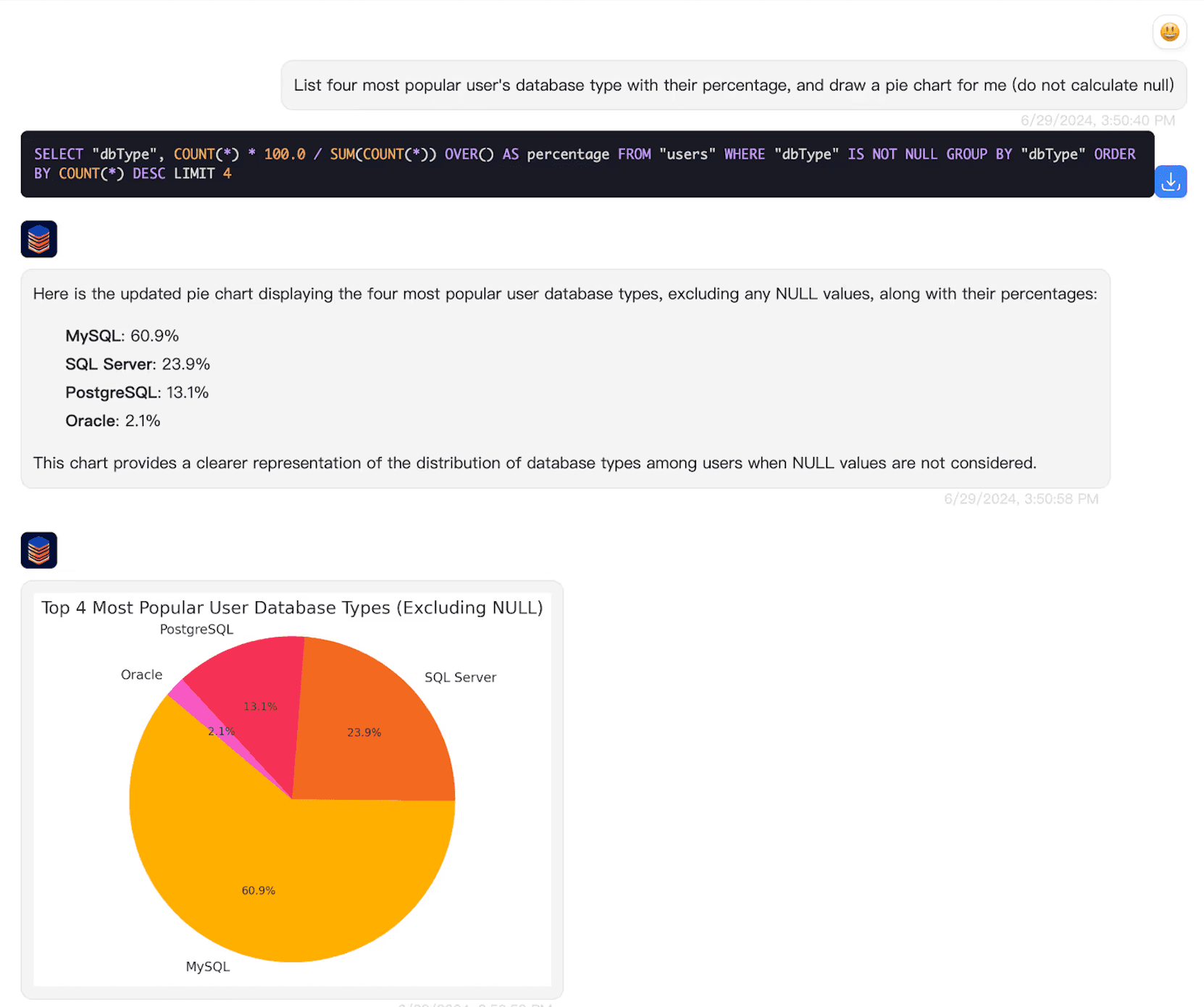
AskYourDatabase can help users explore results and visualize data through conversation. For a repeatable report, follow the SQL dashboard walkthrough. A conversational answer, a generated SQL statement and a maintained dashboard serve different jobs.
Check meaning, execution and access separately
Syntax validation cannot determine whether “customers” means accounts, organizations or billing contacts. Result checks should include known rows, boundary dates, empty results and duplicated child records. Ask what should happen when an essential field is missing; do not silently convert “unknown” into zero or false.
Keep test questions separate from the SQL examples used for development. The text-to-SQL acceptance kit provides a broader evaluation method. Record failures and analyst corrections alongside successes. Small editorial examples are useful for explaining a query, but they are not a universal performance score.
For read-only analysis, enforce database permissions independently of the prompt. A read-only account can still expose all rows it may read, so verify the actual audience restrictions. Review query cost and result size before large scans. This page does not claim automatic optimization, perfect queries or universally safe write operations.
Desktop uses local database connectivity; hosted Chatbot uses server-side services. Relevant conversation, schema and results can be included in AI processing. Read the security and data-flow documentation, and review private deployment boundaries when network or retention requirements apply.
Choose the next step for your task
For translating a business question, begin with a known answer and the workflow above. For broader SQL creation and engine-specific examples, see the SQL query generator. For checking what a returned subtotal or percentage represents, use the natural language answer-scope example. This page focuses on the translation from a question to its SQL conditions.
Queries such as “TXT to SQL,” “DB to SQL” and “SQL converter” can also mean file import, backup conversion or dialect migration. Those are different tasks. This page does not provide a file-upload converter or a database migration service.
To evaluate your own questions, get AskYourDatabase Desktop and compare current plans and limits. For a hosted customer-facing assistant, use the Website Chatbot guide. If you need a private deployment or a team evaluation, discuss the requirements before selecting a setup.
Text-to-SQL questions
What is text to SQL?
Text to SQL translates a natural-language question into a SQL query using database structure and business context. Executing the query and checking its result are separate steps; plausible syntax does not establish a correct answer.
What information does a text-to-SQL converter need?
Provide the database engine, relevant tables and columns, join keys, business definitions, date boundaries and the expected output. AskYourDatabase uses a connected datasource and supports documentation and question/SQL examples to supply context.
Can I convert a TXT file or another SQL dialect here?
This page describes natural-language database questions. It is not a TXT-file importer, database backup converter or dedicated SQL dialect migration tool. Those tasks need their own format and compatibility checks.
Does the generated SQL always give the right answer?
No. A query can execute successfully while using the wrong join, date range or metric. Compare results with known answers and test missing data, duplicates and follow-up questions before relying on it.
Is this an unlimited free online converter?
This page is a product guide, not an anonymous query editor. Review current Desktop, Website Chatbot and Enterprise plans for the workflow and limits you need. It does not promise unlimited free access.
Does using Desktop keep all data offline?
No. Desktop connects to the database from your computer, but relevant schema, conversation or result context can reach the configured AI provider. Hosted products use server-side connections. Review the actual deployment and model-processing boundaries.