
Warehouse AI Assistant vs Custom SQL: Which to Use?
Choose native AI, a connected assistant or maintained SQL by question type. Reconcile a metric change with a runnable example and a practical routing worksheet.
A warehouse AI assistant is useful for asking bounded questions and exploring follow-ups without writing each query by hand. Maintained custom SQL is useful when a report must reproduce an approved definition and a stable output. Many teams need both: use reviewed SQL as a reference, then allow conversational exploration within an agreed data scope.
The decision is about the job each question must accomplish. A monthly operating report, a new breakdown and an undefined business term need different handling. A chat interface alone cannot decide what your organization means by “billable,” and SQL written by an analyst can preserve the wrong definition just as consistently as the right one.
This guide provides a question-routing worksheet and a reproducible definition-change exercise. AskYourDatabase publishes it and is one connected option discussed. Vendor documentation was reviewed on October 22, 2026; this is not an independent product ranking or an AI accuracy benchmark. For Snowflake-specific architecture and purchasing criteria, use the separate Snowflake natural language analytics buyer’s guide.
Decide by the question, then choose the interface
Start by naming the deliverable and its owner. “Answer our warehouse questions” is too broad to evaluate. “Produce the same approved usage total every Monday, with account-level reconciliation” gives the team a concrete contract.
| Question or deliverable | Sensible starting route | What must be agreed |
|---|---|---|
| Recurring report with fixed columns and approved totals | Maintained SQL, view or reporting model | Definition version, refresh boundary, output contract and owner |
| New breakdown of an established metric | Native or connected conversational assistant | Approved metric, allowed dimensions, scope and reference total |
| Repeated question with controlled parameter changes | Reusable reviewed SQL; optionally a conversational entry point | Parameter constraints and evidence of the actual execution path |
| Ambiguous question such as “Which customers are best?” | Clarify before choosing SQL | Meaning of “best,” audience, dates and required evidence |
| Missing data or a forecast beyond available records | Explain the limit or use a separately defined method | Source availability and any justified assumptions |
| Updating operational records | A separately authorized operational workflow | Write capability and controls; outside this reporting comparison |
A native assistant makes sense to evaluate when your team already maintains the platform’s context and permissions. A connected assistant makes sense when its interface, supported connectors or deployment options solve a specific workflow need. Building your own assistant adds application ownership: authentication, conversation handling, error recovery, evaluation and upgrades all need maintainers.
For the broader translation process, read how natural language database queries work. For creating a recurring visual deliverable, the SQL dashboard guide covers a separate implementation task.
Native AI and custom SQL can work together
Do not compare these as “AI without SQL” versus “SQL without AI.” Native tools can generate SQL and use examples supplied by a data team. The important questions are which context is retrieved, which query actually runs, and who maintains the definition when it changes.
Snowflake’s Verified Query Repository supports questions paired with SQL in semantic-model context. Its documentation specifies logical table and column names for those queries. This is evidence of an example-driven workflow, not a guarantee that every later answer reproduces an identical approved query.
Microsoft Fabric’s example-query documentation describes supplied question/query pairs, schema validation and inspecting retrieved examples in run steps. Supported source types differ; do not assume a workflow applies to every semantic model or data source.
Databricks’ Genie Agent setup documentation describes analyst configuration using data, example queries, instructions and trusted assets. Check actual permissions and configuration in your account. These primary sources show that curated SQL and conversation can coexist; they do not establish a winner for your workload.
When repeatability matters, distinguish three things: a saved example used as context, a generated query influenced by that context, and an execution path constrained to approved logic. Record which one your actual product configuration provides. Do not label a generated answer “certified” merely because its setup included a correct example.
Worked example: the same snapshot, two valid definitions
Suppose a team reports successful production usage. Its old definition, v1, counts retry units. A policy change creates v2, which excludes retries. This is a synthetic operating metric measured in integer usage units, not invoices, revenue or real customer activity.
All seven events belong to one fixed reporting snapshot. Each row represents one event; is_retry is explicitly 0 or 1 and units are known non-negative integers. Production timestamps, currency conversion and identity enforcement are outside this small fixture.
| Event | Account | Environment | Outcome | Retry | Units |
|---|---|---|---|---|---|
| 1 | A | production | success | 0 | 100 |
| 2 | A | production | success | 1 | 20 |
| 3 | B | production | success | 0 | 60 |
| 4 | B | production | success | 0 | 40 |
| 5 | B | test | success | 0 | 900 |
| 6 | A | production | failed | 0 | 80 |
| 7 | C | production | success | 0 | 0 |
Ask the assistant: “Using definition v2, show successful production usage by account for this snapshot, excluding retries. Include the zero-unit account.” The reference query is:
SELECT account_id,
       SUM(units) AS v1_units,
       SUM(CASE WHEN is_retry = 0 THEN units ELSE 0 END) AS v2_units,
       SUM(CASE WHEN is_retry = 1 THEN units ELSE 0 END) AS excluded_retry_units
FROM usage_events
WHERE environment = 'production' AND outcome = 'success'
GROUP BY account_id
ORDER BY account_id;
Download the complete runnable definition-change SQL, which includes the invented rows as a common table expression and does not create or update stored tables. It was executed locally in SQLite; adapt and validate identifiers, types and SQL support in your actual warehouse before relying on it. No cloud warehouse or AI model was tested.
| Account | v1 units | v2 units | Excluded retry units |
|---|---|---|---|
| A | 120 | 100 | 20 |
| B | 100 | 100 | 0 |
| C | 0 | 0 | 0 |
| Total | 220 | 200 | 20 |
The entire difference is event 2. Test activity and failed activity are excluded under both definitions. If a maintained report still returns 220 while the assistant returns 200, neither output alone proves a calculation bug: first check the definition version. Conversely, if the assistant labels 220 as v2, it has failed this reference case.
Now ask “Which account generated the most value?” The fixture only measures units. A useful response should clarify whether value means units, revenue or something else. “What will next month’s usage be?” cannot be answered from this snapshot alone. These are proposed behavior checks, not observed model responses.
Change the definition without splitting your numbers
Treat the v1-to-v2 change as a small release with an owner. Keep the data snapshot fixed while comparing results; otherwise new data and changed logic become indistinguishable.
- Record the decision. Write the old and new definitions, business owner, effective date and whether historical reports should be restated. Do not silently relabel old values.
- Find dependent logic. Locate the reporting SQL or view, semantic definitions, assistant instructions, retrieved SQL examples and downstream reports that use the metric.
- Update each relevant artifact. A change in a view does not establish that a separately stored example or cached report has changed. Record each revision explicitly.
- Reconcile the delta. On this fixture, v1 is 220 and v2 is 200, with 20 explained by one retry event. On real data, use the equivalent row-level explanation.
- Run independent checks. Preserve a v1 reproduction case and add v2 expectations. Keep held-out questions separate from examples used to configure the assistant.
- Publish with an owner and rerun trigger. Label the output’s version and repeat checks after schema, permission, model or metric changes that can affect the answer.
The text-to-SQL acceptance kit supplies a broader correctness-testing method. This article’s separate deliverable is the routing and maintenance record: which questions use which path, and which artifacts must change together.
Try the connected route in AskYourDatabase
Use an approved reporting database with limited readable objects. AskYourDatabase supports connected conversation with databases including Snowflake, BigQuery, PostgreSQL and MySQL. Select the actual supported connector and follow the connection documentation; multiple connectors do not imply joins across separate connections.
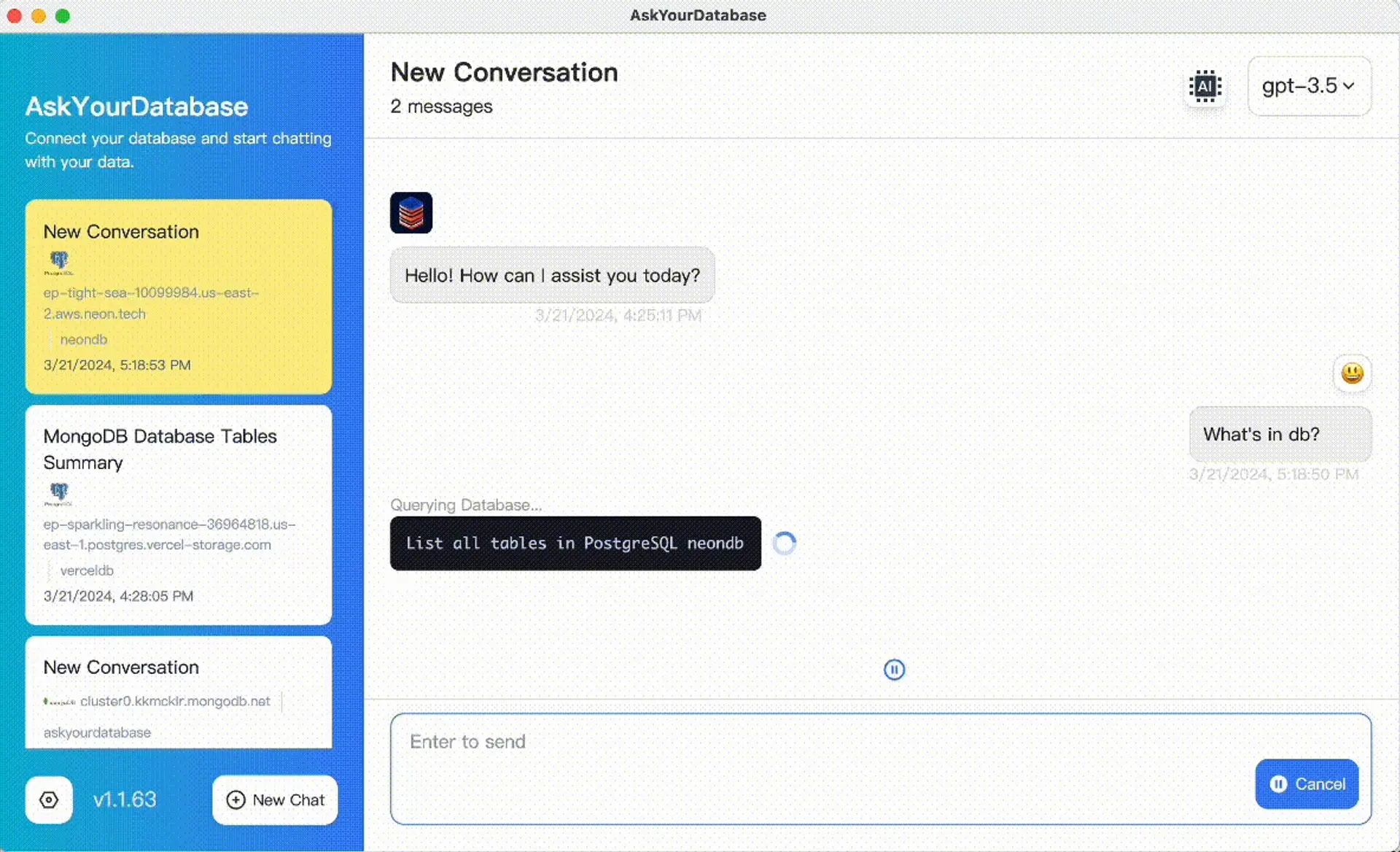
This existing product image illustrates the interface. It is not a screenshot of this fixture being evaluated by an AI model.
For a small evaluation:
- Prepare the reference in an approved test database and verify its result using that engine.
- Check the objects and columns the connection actually exposes. Use approved views where they define the intended reporting scope.
- Add the business definition and a reviewed SQL example through training documentation and SQL examples. Context helps interpretation; it is not an automatic import of another platform’s semantic model.
- Ask a held-out question, inspect its SQL and compare the returned rows with the reference. Repeat after a follow-up changes the account or metric version.
- Save the observed result, configuration and any manual repair in the worksheet. Choose a limited pilot only when it satisfies your requirements.
For individual analysis, start with Desktop and download options. For hosted or private application use, compare plans and private deployment requirements. Desktop SQL execution can be local while model processing still uses external services. Review data flow and security before selecting a deployment. This guide does not promise offline inference, automatic context synchronization or support for every warehouse product.
Compare maintenance and operating cost, not a demo answer
Use the same question families and a comparable data snapshot for each candidate. Record setup work, incorrect answers, clarifications, retries and manual repairs. Keep application fees, warehouse compute, model charges and operator time as separate lines; there is no universal per-question cost in this guide.
For access, record the real execution identity and allowed tables, rows and columns. A native interface, a shared connection or a read-only account does not by itself prove the required audience separation. Use the actual authorization path and test denied access in an approved environment. A prompt-based refusal is not evidence of database enforcement.
Choose a maintained SQL route for a stable recurring contract, then add conversation where changing questions create useful exploration. If maintaining that conversational scope costs more than its benefit, keep the narrow report. If a native assistant already fits the workflow, there is no reason to add another interface solely because it uses AI.
Download the question-routing and definition-change worksheet. It includes the example expectations and leaves actual candidate outcomes blank. It is an editorial planning resource, not a built-in AYD import or workflow automation feature.
Frequently asked questions
Does a built-in warehouse AI assistant replace custom SQL?
It can reduce manual query writing for supported questions, but it does not remove SQL, business definitions or maintenance. Keep reviewed SQL for repeatable deliverables and use conversational exploration where the scope can be checked.
When should a team keep a report in maintained SQL?
Keep a recurring report in maintained SQL when its definition, output columns, time boundary and approval process must remain stable. Version the logic and expected results; a deterministic query can still implement the wrong business rule.
Can native AI assistants use our existing SQL examples?
Some can. Snowflake verified queries and Fabric example queries use supplied question/query pairs in their documented workflows. Check the supported source types and configuration. An example guides generation; it does not prove that every answer executes that exact SQL.
Where does AskYourDatabase fit?
Evaluate AskYourDatabase as a connected conversational interface for a supported database. Add approved context and SQL examples, inspect generated queries and reconcile answers. Do not assume automatic import of another platform’s semantic model or federated joins across connections.
How should we handle a changed metric definition?
Version the definition and update its reporting logic, relevant assistant context, examples, expected results and downstream labels. Reconcile the difference on one frozen dataset before comparing live outputs from different versions.
Was this an AI or warehouse benchmark?
No. The downloadable synthetic SQL reference was executed locally in SQLite. No native assistant, AskYourDatabase model, cloud warehouse or production database was run for this article. The worksheet leaves real evaluation outcomes blank.