
SQL Server AI Chatbot: Setup and T-SQL Validation
Connect SQL Server to an AI chatbot, scope database access, explain reporting views, and validate top-N answers with a concrete T-SQL example and setup checklist.
A SQL Server AI chatbot translates business questions into T-SQL, runs queries through a permitted database connection, and explains the returned data. To make it useful for reporting, connect a restricted account, describe your reporting views and business definitions, and validate results before sharing them. A successful connection alone does not establish correctness or tenant isolation.
This guide covers relational reporting against Microsoft SQL Server: connection setup, schema visibility, and a concrete top-customer test. It is written by AskYourDatabase and includes our product workflow. The example uses invented data; it is not a customer result or an AI accuracy benchmark.
Choose the SQL Server workflow you actually need
| Your task | A suitable starting point | What you must validate |
|---|---|---|
| Explore queries inside an existing developer environment | An SQL editor with AI assistance, such as Copilot in SSMS | Execution permissions, approval behavior, and generated changes |
| Let a business user ask questions and follow up with charts | A connected conversational tool such as AskYourDatabase Desktop | Metric definitions, data sent to the model, and answer accuracy |
| Offer analytics inside your customer-facing application | A Website Chatbot with an authenticated integration | Identity propagation, row access, and cross-tenant tests |
| Build a custom SQL agent with your own interface | A developer framework and SQL Server connector | Query execution controls, evaluation, hosting, and maintenance |
Microsoft's current Copilot Agent mode documentation describes a preview that can execute queries and commands with approval and the configured SQL permissions. Other assistants are therefore not limited to drafting SQL. Compare the workflow and access model you need, rather than assuming one product category cannot execute queries.
For a broader architecture choice, see our database assistant alternatives guide. If your task is only generating a query, start with the SQL Server query generator; this article focuses on connecting and validating a conversational reporting workflow. For event-history questions, the generator includes a latest-status T-SQL example that separates snapshot cutoff, ranking and final status filtering.
For an interface decision, the SQL Server GUI guide compares Desktop analysis with SSMS and VS Code, including operating-system and authentication checks.
Prepare SQL Server access before connecting an AI tool
Ask the database owner to identify a small reporting surface: for example, approved customer and sales views in a reporting schema. Record the server endpoint, database name, authentication method, required network access, and intended users. A network route from your laptop does not imply the same route is available from a hosted chatbot.
Use a dedicated account with only the permissions needed for that surface. Avoid connecting a database-owner or server-administrator account for a reporting trial. Microsoft documents object-level SELECT grants; the database owner should choose the scope and check inherited permissions. A prompt asking for “read-only queries” does not reduce the privileges of the underlying account.
Decide separately which rows and columns each user may see. Read-only access can still reveal sensitive data, and a large SELECT can consume resources. For customer-facing use, evaluate the access-control workflow and perform negative tests under separate identities. Selecting tables in an AI interface is not proof that the database account cannot reach other tables.
Why schemas and views matter
Use qualified names such as reporting.CustomerSales, particularly when more than one schema contains an object with the same name. Document what one row represents, its currency, the reporting date, cancellation rules, and any aggregation already performed in the view. Adding order-line data to an already aggregated customer view can multiply totals.
SQL Server limits visible metadata according to permissions. A view may be queryable while its definition is unavailable, so the assistant may need reviewed documentation even after it discovers the object. Check Microsoft's metadata visibility guidance with your DBA. Do not grant broad access merely to make schema discovery appear complete.
Connect SQL Server to AskYourDatabase
1. Choose Desktop or a hosted chatbot
Use the Desktop download and setup page for an internal evaluation. Desktop connects from your computer, so that machine needs access to the SQL Server endpoint. The hosted Website Chatbot uses a server-side connection; follow the network instructions in the connection documentation.
Local query execution does not mean offline AI. Questions, schema context, and relevant result data can be sent to an external model through the AI gateway. Before connecting sensitive data, review the security documentation and confirm the actual deployment's model provider, storage, and network boundaries. For private deployment, application hosting and model inference are separate decisions.
2. Enter the documented connection format
Select SQL Server and enter an ADO.NET-style connection string in the connection setup. This is a placeholder example, not a live credential:
Data Source=sql-host;Initial Catalog=ReportingDb;User ID=report_reader;Password=YOUR_PASSWORD;
The exact server endpoint, port, and authentication support must match your environment. Do not assume Windows integrated authentication or Microsoft Entra authentication works just because the connection works in SSMS. Confirm the required method before adopting the product. Keep passwords out of chat questions, screenshots, and shared training examples.
Have the database owner verify encryption and certificate handling for the actual client and server. A successful connection is not evidence that transport protection meets your policy. If you encounter a certificate error, investigate the endpoint and certificate configuration; do not treat disabling encryption or certificate validation as the standard fix.
3. Add context for your reporting views
Start with one approved metric. In the training workflow, add its definition and a reviewed question-and-SQL example. For example:
Revenue means the sum of paid sales in USD for the requested calendar month. Use the reporting date recorded in the view. Rank customers by revenue descending; if exactly two customers are requested, break equal revenue by customer ID ascending. Never combine currencies.
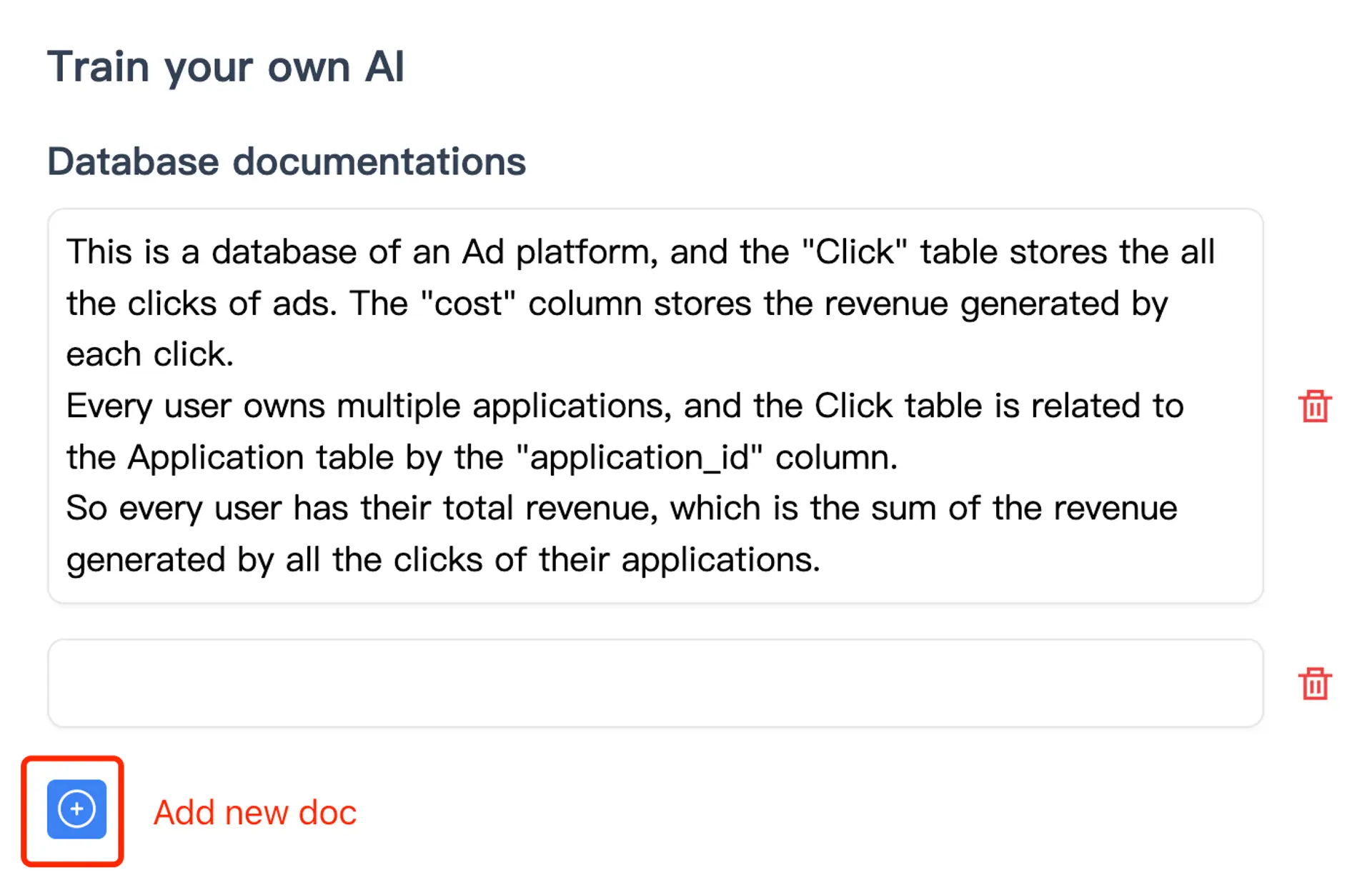
The screenshot shows AskYourDatabase's context-entry workflow. It does not prove a particular SQL Server answer was generated correctly. Recheck saved examples when a view definition, status mapping, or business rule changes.
4. Validate a known answer, then ask a follow-up
Choose a number the reporting owner can independently reproduce. Ask the assistant to show its SQL, included dates, filters, units, and result. Compare both the rows and the total with the reference before requesting a chart.
Then change one requirement: “include all customers tied for second place” or “show the same ranking for the following month.” Check which filters remain and which changed. The natural-language query validation guide covers broader join, date, and follow-up checks.
A T-SQL acceptance example: top customers and ties
“Top two customers” is ambiguous when two customers have equal revenue. This small synthetic fixture makes the difference visible without accessing any real tables. The amounts below are invented USD values. The expected totals were independently reconciled in a local calculation; this guide does not claim an executed SQL Server or product benchmark. Run the T-SQL in your own non-production SQL Server evaluation environment.
The task is: For August 2026, return exactly two customers by paid revenue, using customer ID ascending to break ties. Treat the literal reporting dates as dates in the agreed reporting calendar; this example does not convert time zones.
;WITH sales AS (
    SELECT customer_id, report_date, status, amount
    FROM (VALUES
        (101, CAST('20260801' AS date), 'paid',      CAST(120.00 AS decimal(12,2))),
        (101, CAST('20260812' AS date), 'paid',      CAST( 80.00 AS decimal(12,2))),
        (102, CAST('20260815' AS date), 'paid',      CAST(150.00 AS decimal(12,2))),
        (103, CAST('20260820' AS date), 'paid',      CAST(150.00 AS decimal(12,2))),
        (104, CAST('20260821' AS date), 'paid',      CAST( 90.00 AS decimal(12,2))),
        (102, CAST('20260822' AS date), 'cancelled', CAST(900.00 AS decimal(12,2))),
        (104, CAST('20260901' AS date), 'paid',      CAST(700.00 AS decimal(12,2)))
    ) AS v(customer_id, report_date, status, amount)
), totals AS (
    SELECT customer_id, SUM(amount) AS paid_revenue
    FROM sales
    WHERE status = 'paid'
      AND report_date >= CAST('20260801' AS date)
      AND report_date < CAST('20260901' AS date)
    GROUP BY customer_id
)
SELECT TOP (2) customer_id, paid_revenue
FROM totals
ORDER BY paid_revenue DESC, customer_id ASC;
Expected eligible totals are customer 101: 200, 102: 150, 103: 150, and 104: 90, adding up to 590 USD. The query should return only 101 and 102, with a displayed total of 350 USD. The cancelled 900 and September 700 do not belong in August paid revenue.
Now ask: “Include all customers tied at the cutoff.” Keep the CTEs and replace the final SELECT with:
SELECT TOP (2) WITH TIES customer_id, paid_revenue
FROM totals
ORDER BY paid_revenue DESC;
This version should include 101, 102, and 103, totaling 500 USD. The relative display order of the two 150 rows is unspecified. Including customer_id in this version's ORDER BY would make those rows distinct for tie matching and defeat the intended revenue-only tie rule. Microsoft's TOP documentation explains ordering and WITH TIES semantics.
| Follow-up test | Expected behavior |
|---|---|
| Exactly two customers | 101 and 102; 350 USD |
| Include revenue ties at the cutoff | 101, 102, and 103; 500 USD |
| Remove the row limit | Four customers; 590 USD |
| Use September instead | Customer 104; 700 USD |
| Ask for a month with no rows | Explain that no matching sales were found; do not invent customers |
| Chart the top-two answer | Label it as a limited ranking, not the full 590 USD monthly total |
A passing arithmetic check does not test authorization. This fixture has no tenant column or production permissions. Test access separately with the actual database accounts and application identities used in your deployment.
Troubleshoot connection and answer problems separately
| Symptom | Check first | Avoid this shortcut |
|---|---|---|
| Connection times out | Server endpoint, configured port, firewall, and the route from the actual connection host | Opening SQL Server to every IP |
| Login fails | Database selection, account state, and supported authentication mode | Substituting an administrator account |
| Expected view is missing | Schema-qualified name and effective metadata/object permissions | Granting database-wide privileges without review |
| View appears but its meaning is unclear | Reporting grain, definition, comments, and reviewed metric documentation | Assuming inferred joins are correct |
| Syntax works but rankings disagree | Paid-status filter, date boundary, aggregation, and tie policy | Accepting a plausible chart as validation |
| Query is slow | Execution plan, reporting surface, query limits, and workload impact | Assuming TOP prevents a large scan or sort |
For a SQL Server browsing workflow, see the SQL Server GUI page. For customer-facing deployment, continue with the embedded analytics chatbot evaluation and implementation guide, including identity and tenant tests. Compare Desktop, Website Chatbot, and Enterprise plans once you know the required workflow and data boundaries.
Frequently asked questions
Can I chat with a SQL Server database without writing SQL?
Yes. A connected assistant can turn a question into T-SQL, execute it with the configured database account, and explain the result. You still need a permitted connection, clear metric definitions, and checks against known answers.
Does AskYourDatabase accept a SQL Server connection string?
The documented format is Data Source=host;Initial Catalog=database;User ID=user;Password=password;. Enter real credentials only in the connection setup. Confirm the required authentication method, network route, and encryption settings for your deployment.
Does a read-only SQL Server account enforce tenant isolation?
No. Read-only permissions restrict changes, but the account can still read the rows it is authorized to access. Tenant isolation requires independently enforced database or application controls, tested with more than one identity.
Why can the chatbot connect but fail to find a SQL Server table or view?
Check the selected database, schema-qualified object name, and effective permissions of the same account used by the chatbot. Metadata visibility can differ from an administrator connection. Review narrowly scoped metadata access with your database owner.
Why can a top-five SQL Server report return more than five rows?
TOP (5) WITH TIES can include additional rows tied on its ORDER BY values. For exactly five rows, use TOP (5) with a deterministic tie-breaker. Decide which behavior the business question requires before validating the answer.
Does running the Desktop app mean all AI processing stays offline?
No. The Desktop app connects to the database and executes queries from your computer, while its AI workflow can send questions, schema context, and relevant result data to an external model through a gateway. Review the full data flow before using sensitive information.