
Query ERP Data with AI: A Read-Only Reporting Guide
Query ERP data using natural language with a tested receivables SQL example, company access checks, reporting-date rules, and an AskYourDatabase setup guide.
Employees can query ERP data using natural language when approved business data is available in a supported database. The reliable route is to connect an AI database assistant to a controlled reporting dataset, define the business metrics, and check generated answers against an existing report. Giving an assistant access to every operational table is rarely a useful starting point.
This guide shows how to build that workflow for an accounts-receivable question. It includes a synthetic PostgreSQL example with known answers, explains why joins and reporting dates matter, and shows where AskYourDatabase fits. It is written by the AskYourDatabase team; the example is a reproducible SQL test, not a customer result or an AI accuracy benchmark.
For pre-sale opportunities rather than posted invoices, follow the CRM pipeline analysis guide. Its worked example checks deal grain, probability coverage and contact-join inflation.
Choose the reporting path before the AI tool
An ERP is an application with its own permissions, workflows, and accounting rules. Its underlying database is not necessarily an approved integration interface. Confirm the supported extraction path with the system owner before requesting credentials.
| Data path | Suitable starting point | What the team must establish |
|---|---|---|
| Approved reporting views | A self-managed database with documented reporting objects | Who owns each view, permitted fields, company scope, and query limits |
| Read replica or warehouse | Analytical queries need separation from transaction processing | Replication lag, deletion handling, refresh consistency, and source reconciliation |
| Vendor-supported export | The ERP restricts direct production database access | Exported entities, refresh schedule, source permissions, and destination access |
| API ingestion into a reporting database | Required data is exposed through an approved API | A maintained ingestion process, pagination, change tracking, and failed-sync handling |
For example, Microsoft's Dynamics 365 Finance and Operations BYOD documentation describes exporting entities into a customer's Azure SQL database. It also states that the application does not allow direct T-SQL connections to its production database. That is a vendor-specific export route, not a claim that AskYourDatabase supplies or operates the integration.
AskYourDatabase connects to supported databases. Your team prepares the ERP data in the selected database first. A SQL Server connection does not automatically create a Dynamics connector; a database connection alone does not synchronize an ERP or reproduce its application permissions.
For the general concepts, use our natural language database query guide. This article focuses on ERP reporting scope, dates, joins, and reconciliation. Our ERP integration customer story provides separate historical context; the fixture below does not represent that customer's systems.
Define the question as a reporting contract
“Who owes us money?” leaves several decisions unresolved. Use a question a finance or operations owner can check:
For company 10, show open posted USD invoices as of September 20, 2026. Subtract payments posted on or before that date. Group by customer and split balances into not-yet-overdue, 1–30 days overdue, and more than 30 days overdue. Treat invoices due on the report date as not yet overdue. Do not convert currencies.
Write down the contract before adding examples to the assistant:
- Grain: one invoice is identified by company and invoice ID together. One invoice may have many payment allocations.
- Cutoff: include invoices issued by the report date and payments posted by that same date.
- Status: include posted invoices and exclude voided invoices.
- Currency: report USD only; do not add EUR values or silently apply exchange rates.
- Scope: company 10 is the reporting scope. Actual user authorization must be enforced separately at the database or approved access layer.
- Freshness: identify the dataset snapshot and last successful refresh. A recent page load does not prove the underlying ERP data is current.
The sample deliberately leaves out credit notes, unapplied cash, payment reversals, disputed balances, tax allocation, and foreign-exchange adjustments. Those rules must be added for your ERP before using this as an operational report. It is a query-design exercise, not a statutory accounting method.
Run a receivables example with known answers
The following PostgreSQL statement contains its entire dataset in common table expressions. It reads invented rows and does not create or update database tables. Run it in a local test environment. SQL Server and other engines require dialect adjustments.
The fixture includes a partially paid invoice, a future payment, an invoice due on the cutoff date, a voided invoice, a different currency, a future invoice, and a second company reusing invoice ID 1. These are common ways a plausible-looking query can produce the wrong total.
WITH params AS (
  SELECT DATE '2026-09-20' AS as_of_date,
         10 AS company_id, 'USD' AS currency
), invoices(company_id, invoice_id, customer_id, invoice_date,
            due_date, currency, status, amount) AS (
  VALUES
    (10, 1, 101, DATE '2026-08-01', DATE '2026-08-31', 'USD', 'posted', 1000.00),
    (10, 2, 101, DATE '2026-09-01', DATE '2026-09-30', 'USD', 'posted', 600.00),
    (10, 3, 102, DATE '2026-07-01', DATE '2026-07-31', 'USD', 'posted', 400.00),
    (10, 4, 102, DATE '2026-08-01', DATE '2026-08-31', 'USD', 'void', 900.00),
    (20, 1, 201, DATE '2026-08-01', DATE '2026-08-31', 'USD', 'posted', 5000.00),
    (10, 6, 102, DATE '2026-08-01', DATE '2026-08-31', 'EUR', 'posted', 700.00),
    (10, 7, 102, DATE '2026-09-01', DATE '2026-09-20', 'USD', 'posted', 250.00),
    (10, 8, 101, DATE '2026-09-21', DATE '2026-10-21', 'USD', 'posted', 800.00)
), payments(company_id, invoice_id, payment_date, amount) AS (
  VALUES
    (10, 1, DATE '2026-08-10', 200.00),
    (10, 1, DATE '2026-09-10', 300.00),
    (10, 1, DATE '2026-09-21', 100.00),
    (10, 2, DATE '2026-09-05', 200.00),
    (10, 3, DATE '2026-08-01', 100.00),
    (20, 1, DATE '2026-08-10', 1000.00)
), paid_as_of AS (
  SELECT p.company_id, p.invoice_id, SUM(p.amount) AS paid
  FROM payments p
  CROSS JOIN params x
  WHERE p.payment_date <= x.as_of_date
    AND p.company_id = x.company_id
  GROUP BY p.company_id, p.invoice_id
), balances AS (
  SELECT i.customer_id,
         i.amount - COALESCE(p.paid, 0) AS balance,
         x.as_of_date - i.due_date AS days_overdue
  FROM invoices i
  CROSS JOIN params x
  LEFT JOIN paid_as_of p
    ON p.company_id = i.company_id AND p.invoice_id = i.invoice_id
  WHERE i.company_id = x.company_id
    AND i.currency = x.currency
    AND i.status = 'posted'
    AND i.invoice_date <= x.as_of_date
)
SELECT customer_id,
       SUM(balance) AS open_usd,
       SUM(CASE WHEN days_overdue <= 0 THEN balance ELSE 0 END) AS current_usd,
       SUM(CASE WHEN days_overdue BETWEEN 1 AND 30 THEN balance ELSE 0 END) AS overdue_1_30_usd,
       SUM(CASE WHEN days_overdue > 30 THEN balance ELSE 0 END) AS overdue_31_plus_usd
FROM balances
WHERE balance > 0
GROUP BY customer_id
ORDER BY customer_id;
Expected output:
| customer_id | open_usd | current_usd | overdue_1_30_usd | overdue_31_plus_usd |
|---|---|---|---|---|
| 101 | 900.00 | 400.00 | 500.00 | 0.00 |
| 102 | 550.00 | 250.00 | 0.00 | 300.00 |
Manual reconciliation gives the same result. Invoice 1 has 1,000 − 200 − 300 = 500 outstanding; the September 21 payment is outside the cutoff. Invoice 2 has 400, invoice 3 has 300, and invoice 7 has 250. The total is 1,450 USD, split into 650 current, 500 overdue by 1–30 days, and 300 overdue by more than 30 days.
Payment rows are aggregated before joining to invoices. Joining invoices directly to every payment and then summing invoice amounts would repeat the invoice principal. The company identifier is also part of the join; invoice IDs need not be globally unique across ERP companies.
Negative and zero balances are excluded from this open-debit example. A production reconciliation must account for credit balances separately instead of silently discarding them. All dates here are calendar dates. If your ERP stores timestamps, establish the reporting timezone and end-of-day boundary before adapting the query.
Configure AskYourDatabase for the approved dataset
1. Prepare a narrow reporting connection
Ask the database owner to expose the required invoice and payment objects with a dedicated reporting identity. Start with one company and one reporting task. Follow the database connection guide; PostgreSQL users can also consult our PostgreSQL chatbot setup article.
Verify permissions using the actual identity the assistant will use. PostgreSQL documents object privileges in its GRANT reference. Read access should be limited to intended objects; role memberships, inherited grants, and callable functions also need review. Hiding a table in the interface or writing “never modify records” in a prompt is not a substitute for database permissions.
2. Teach the reporting meaning
In Desktop, use the training feature to add short definitions and approved question/SQL examples, as described in Training for Better Answers. Document the company key, invoice status, payment cutoff, currency, and the difference between invoice date and due date. Use several focused entries rather than a long, ambiguous instruction.
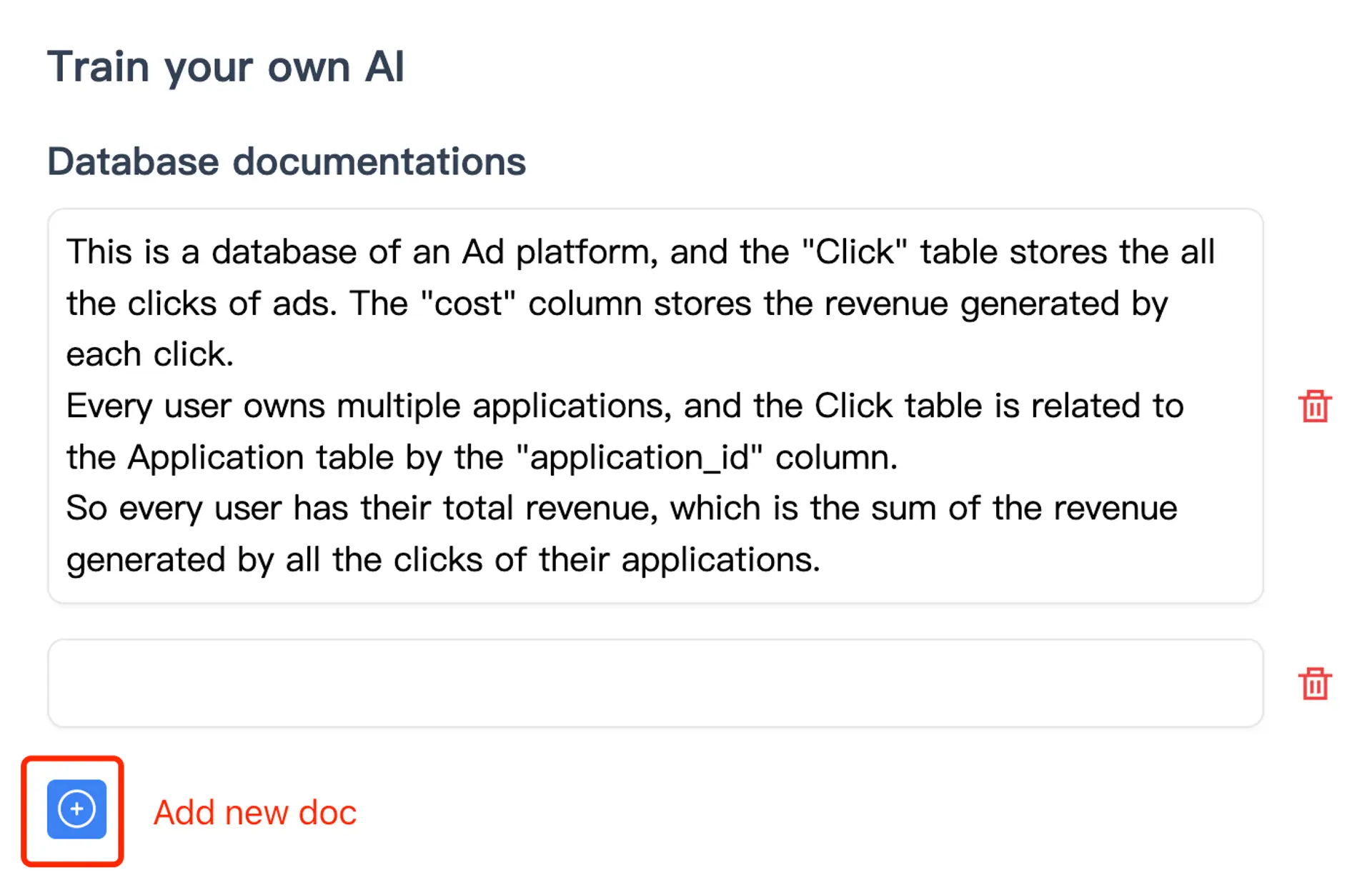
For instance, one definition can say: “Invoice identity is company_id plus invoice_id. Join payment allocations using both columns.” Another can define the date cutoff. The screenshot illustrates the product's training interface; it is not an ERP connector screen or evidence of the sample's AI accuracy.
3. Ask, inspect, and reconcile
Use the reporting contract as your first question. Inspect the generated SQL and compare its result with the fixture or an approved ERP report using the same snapshot. Check the total and a few invoice-level balances. Successful SQL execution proves neither correct business meaning nor complete data.
Then try a follow-up: “Keep the same report date and company, and show only customers with balances more than 30 days overdue.” The fixture should identify customer 102 with 300 USD in that bucket. Verify that the follow-up retained both the company and cutoff conditions.
4. Visualize after the numbers pass
Ask for a chart of the three aging buckets once the table reconciles. Preserve the report date, company, currency, and refresh timestamp alongside any exported result. A chart labeled simply “receivables” loses the context needed to interpret it later.
The Desktop download guide explains setup and troubleshooting. Review current pricing for the relevant product. If the intended experience is a portal for customers rather than internal staff analysis, follow the separate embedded chatbot implementation guide, including its user-isolation checks.
Test the boundaries before sharing the report
Use an acceptance table that a reporting owner and a database owner can review together. These are checks to perform, not a claim that the product automatically enforces each control.
| Test | Expected behavior | What a failure usually means |
|---|---|---|
| Multiple payments on one invoice | Invoice principal counted once | Join grain is wrong |
| Payment after September 20 | Excluded from the September 20 report | Payment cutoff is missing |
| Invoice due September 20 | Included in current balance | Aging boundary differs from the contract |
| Company 20 reuses invoice ID 1 | Does not alter company 10's balance | Join or scope condition is incomplete |
| User requests an unauthorized company | Access is denied by the configured permission boundary | Application scope was mistaken for database authorization |
| A refresh fails halfway through | Report is withheld or clearly marked incomplete | Snapshot consistency is not established |
| User requests an update or delete | Reporting identity cannot modify business records | Grants are broader than the intended reporting use |
| A large historical query runs | Agreed timeout and workload limits apply | Reporting load was not separated or bounded |
The SQL fixture checks calculation logic. It cannot prove authorization, because its rows all exist inside one statement and its company filter is only a reporting condition. Test permissions independently with approved test data and identities. Avoid running destructive permission tests against production records.
Synchronization deserves its own test. If invoices refresh before payments, a report can temporarily overstate open balances even with correct SQL. Read from an agreed consistent snapshot, publish refresh completion metadata, and reconcile record counts or control totals. AskYourDatabase querying the destination does not guarantee the upstream export completed.
Review data flow and ownership
Desktop establishes the database connection and executes SQL from your computer. The standard AI workflow still uses cloud AI services; relevant schema, questions, and result context may be processed for answers. Review the security documentation and your organization's data policy before connecting sensitive records. Local query execution is not the same as offline inference.
If private deployment is required, use the on-premise documentation to frame a discussion about model endpoints, logs, backups, storage, and network paths. Validate the intended configuration instead of assuming a deployment label answers every residency question.
Assign owners to three separate jobs: the ERP team maintains the supported extraction route, the database team controls the reporting access and workload, and the business owner approves the metric definitions and reconciliations. Start with one report that passes those checks, then expand to adjacent questions. That makes a useful evaluation much more concrete than asking whether an AI “understands the whole ERP.”
Maintenance work orders need different reporting rules from invoices. Use the CMMS backlog and overdue-work-order example to reconcile a fixed maintenance snapshot, including unknown due dates and missing effort estimates.
Frequently asked questions
Can employees query ERP data using natural language?
Yes, when permitted ERP data is available in a supported database and its business definitions are documented. A database owner must configure access and validate results; natural language does not replace ERP permissions or reporting rules.
Does AskYourDatabase include a native connector for every ERP?
No. Database support does not imply a native connector for every ERP product. This workflow connects to an approved reporting database or replica. Your ERP administrator owns any export, replication, or API ingestion needed to prepare it.
Can AI query an ERP database without changing records?
Use a dedicated database identity with only the required read permissions on approved reporting objects. Also review inherited permissions and executable functions. Asking an AI to be read-only is not an access-control boundary.
Why can an AI receivables report disagree with the ERP?
Common causes include different report dates, payments after the cutoff, duplicated invoice rows, missing credit notes, different company filters, currency conversion, and incomplete synchronization. Compare the same scope and snapshot with an approved ERP report.
Can I combine multiple companies or currencies in one answer?
Only with explicit rules. Include company identifiers in joins and access controls. Keep currencies separate unless a documented exchange-rate source, date, and conversion method are supplied. A prompt filter alone does not enforce company isolation.
Does local ERP querying mean the AI stays offline?
No. AskYourDatabase Desktop connects and executes SQL from your computer, while the standard AI workflow uses cloud AI services. Review schema, prompt, and result-data handling before connecting sensitive ERP information.