Conversational Analytics APIs: Answers, SQL and Charts
Compare analytics API outputs, distinguish chart images from reusable data, and test streaming responses with a runnable example before building a custom UI.

A conversational analytics API can return an answer, SQL, result rows and a visualization, but those outputs are separate contracts. Google Conversational Analytics, Snowflake Cortex Agents and AskYourDatabase expose different response shapes. Choose an API by the artifacts your application must consume, then verify how they relate to the same question and execution.
This guide is for teams building a custom analytics interface or evaluating a headless integration. It compares documented outputs, walks through AskYourDatabase's event model, and provides a runnable stream-parsing check. For an iframe and tenant-session workflow, use the embedded chatbot guide; for orchestrating database tools, use the query-to-answer loop.
AskYourDatabase publishes this guide. Product behavior was checked against its implementation and public documentation on November 10, 2026. Other products are described from their linked official documentation. The included fixtures are synthetic; no live provider benchmark or customer result is claimed.
Compare the outputs your application actually needs
A screenshot of a chart does not establish that an API returns its underlying rows. Likewise, a SQL string does not establish that the statement ran. Ask the vendor to demonstrate your intended endpoint and data source, rather than a different product UI.
| API | Documented output surface | Integration decision |
|---|---|---|
| Google Conversational Analytics | Text, query/data and chart messages; charts can contain Vega-Lite JSON. SVG output has specific Looker and API-version conditions | Check the selected data source, version and chart format before choosing a renderer |
| Snowflake Cortex Agents Run | Text/tool responses, SQL-related results, tables with query identifiers, and chart events with serialized Vega-Lite specifications | Preserve tool and query identifiers; handle the response types for the configured tools |
| AskYourDatabase Ask API | SSE text, tool status, diagnostic code/results and generated-image URLs | Parse the stream, restrict diagnostics, and distinguish image display from rendering your own chart |
Google's integration patterns and visualization guide describe its custom application path. Snowflake's Agents Run API defines table, chart and tool events. Its SQL-generation update also shows why parsers must follow current tool types rather than one historical example. This is a contract comparison, not an accuracy, price or performance ranking.
Separate five requirements in your evaluation:
- Answer text: partial versus final content, clarification questions and error messages.
- Query evidence: generated code, executed code where available, tool identity and execution outcome.
- Data: column types, units, nulls, row limits, pagination and whether the returned rows are complete.
- Visualization: an image URL, a chart specification, or structured series that your own renderer consumes.
- Lifecycle: conversation identity, interruption, retry behavior, artifact lifetime and access controls.
If you need sortable tables and interactive charts, prioritize typed data and result completeness. If you only need a visual attachment, an image may be enough. Define this before comparing feature lists.
How AskYourDatabase returns an answer and its artifacts
Start with API authentication and chat creation, then send a question to the Ask API from your backend. Associate each chat with an authenticated application user; possessing a chat identifier alone is not your authorization design. Keep API keys and database credentials out of browser code.
For a controlled evaluation, ask: “Show approved sales by month, explain the total, and create a chart.” Record the metric definition and expected result first. A model may ask a clarification question or produce no chart; do not assume every request emits every event type.
| Event | What to retain | What it does not establish |
|---|---|---|
isText | Append text fragments in order | Text alone does not prove successful SQL execution; errors may also arrive as text |
isExecutionStatus | Tool name, identifier and started/completed state | Completed is a lifecycle signal, not proof that the result contains successful rows |
isSQL in diagnostic output | Identifier, code and result payload; correlate with tool status | The flag is not an exclusive SQL type: Python and other tool diagnostics can use it |
isImage | Image URL and its place in the response | It is not a portable chart specification or a separate chart-data array |
Inspect the result payload for an error message before treating it as rows. Preserve all query attempts rather than retaining only the last code block. When access-control processing changes a query, diagnostic code can include both original and applied forms; do not automatically execute that display string.
Debug is an evaluation mode, not just a display preference. It can expose code and results, and configured mock context can be used when testing access-control rules. Test a production user's actual identity path separately. Restrict diagnostic access and follow the access-control documentation. This guide does not change those runtime rules.
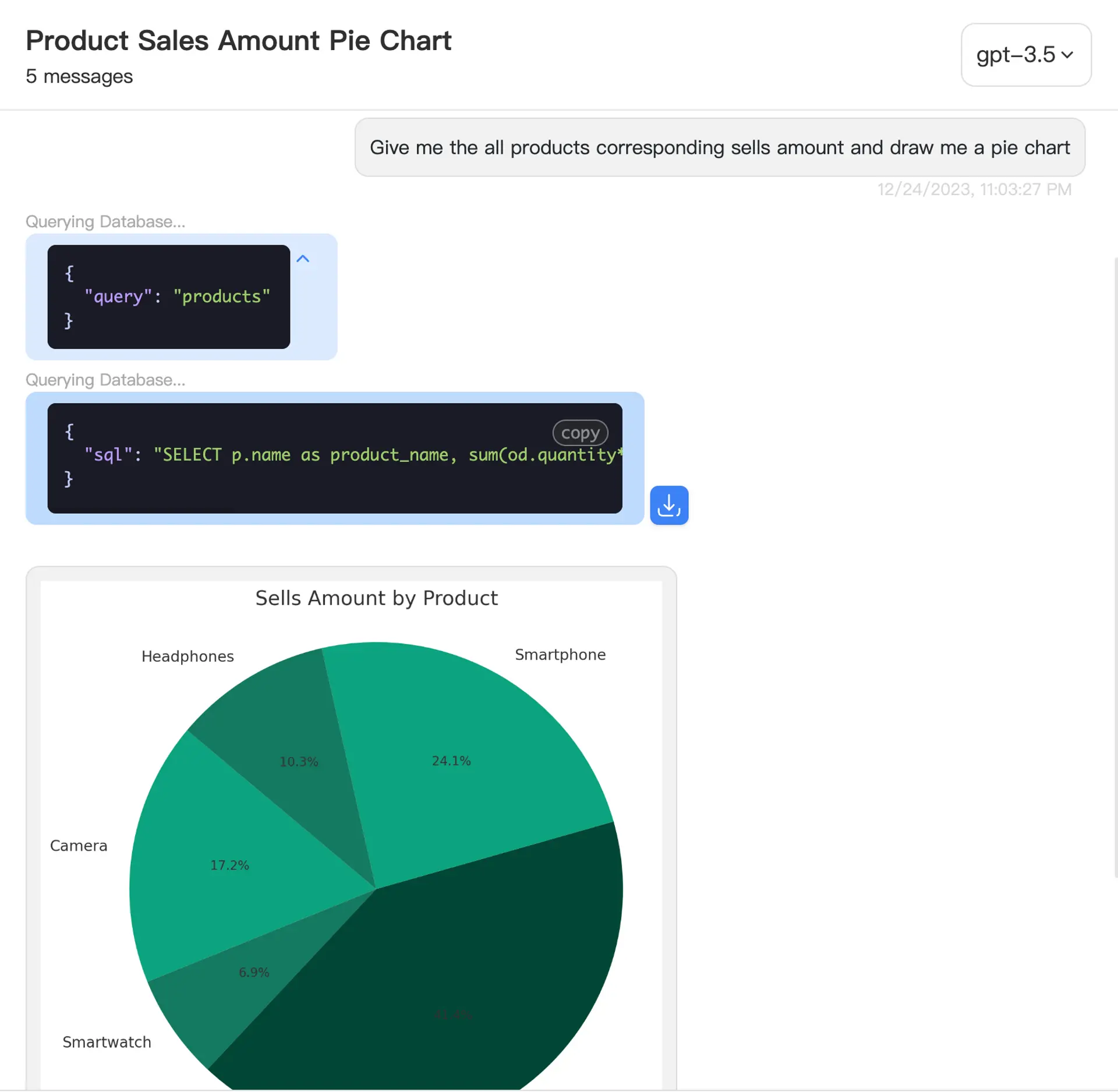
This image shows AskYourDatabase's product interface. It is not a screenshot of an API response, proof of a particular event sequence, or a guarantee that a custom frontend receives the same chart controls.
Use the Messages API when reviewing history, but map its documented fields separately. For example, stored history uses issql and isimage, while live events use isSQL and isImage. History retrieval is not a documented substitute for replaying a dropped stream from an exact byte position.
Parse complete SSE frames, not network chunks
One network read can contain half a JSON object, several events, or part of a multibyte character. A client that splits each chunk and immediately parses every data: line may lose valid output. The HTML event-stream specification defines UTF-8 decoding, line handling and blank-line event boundaries; transport chunk boundaries have no such meaning.
Download both files into a local scratch directory:
Run them with a Node.js runtime that provides Response, ReadableStream and TextDecoder:
node check-stream.mjs
The checks feed synthetic text, query-result, execution-status and image events through every possible two-chunk split, then through one byte at a time. They also cover multiple events in one read, CRLF and CR delimiters, multiline data, an unfinished last frame, invalid JSON, invalid UTF-8, HTTP errors and the example size limit. The fictional image URL is never fetched. No SQL, model, account or external API is accessed.
In an authorized server-side integration, the parser can consume the Response returned by your API request:
import { readJsonEvents } from "./read-json-events.mjs";

// response comes from your authenticated backend request.
for await (const event of readJsonEvents(response)) {
  // Route by the documented event shape and preserve tool identifiers.
  // Apply your application's authorization and presentation rules here.
  handleEvent(event);
}
handleEvent is your application code, not a supplied SDK method. The reader is deliberately limited to JSON in SSE data fields; it does not implement reconnection, named-event routing or a vendor-independent SDK. It rejects a partial final frame rather than silently accepting it. The size guard is an example buffer limit; choose limits that fit approved results and server budgets.
A clean transport end is still not a successful business answer. Track pending tool calls and inspect error payloads. After a disconnection, show the answer as incomplete and reconcile the chat before offering a retry. Do not blindly repeat a POST that may already have executed and consumed quota. Add cancellation and timeouts around your real request; the offline parser does not provide a whole integration lifecycle.
Verify the answer, table and chart together
Use a small approved dataset with a known result. For example, create a synthetic fixture with January sales of USD 12 and February sales of USD 8. A two-month total should be USD 20, and a two-point monthly chart should contain 12 and 8 under the same filters. These numbers define an acceptance case, not measured product output.
| Test | Accept only when | Failure to catch |
|---|---|---|
| Text and table agree | The answer's USD 20 total reconciles to the two monthly rows | A prose answer uses a different date range |
| Chart and table agree | The chart uses the same units, months and data scope | An image looks correct but omits February |
| Empty and failed results differ | An empty successful result is distinct from timeout or denial | A failed lookup becomes a zero-sales answer |
| Partial results are labeled | Row limits and completeness are explicit | A preview is presented as the full dataset |
| Diagnostics remain restricted | Only authorized reviewers see code and sensitive results | Debug output leaks into an end-user component |
| History and interruption work | Reloaded history and incomplete streams have explicit UI states | A partial answer is rendered as complete after refresh |
For your own chart renderer, obtain verified structured rows through an approved path, normalize the numeric types and null handling, and apply a documented chart mapping. Do not scrape values from the assistant's prose or infer them from pixels. If the API returns a specification, review its data references and rendering behavior before displaying it in your application.
A result link also needs separate checks: who may open it, whether it reruns a query, how it expires, and whether its data still represents the original answer. For repeatable numeric review, retain an authorized snapshot or execution reference according to your policy. See the analytics audit-evidence guide for that separate task.
Run a focused integration pilot
For AskYourDatabase, first verify your supported database connection, approved reporting scope and business context. Use a restricted test dataset, create the chat on the backend, and exercise the documented events before styling the interface. Confirm the intended API access and quotas against your plan; this guide does not promise a free tier or unlimited calls.
Test one normal question, one follow-up, one clarification, one empty result and one execution failure. Record actual outcomes in your environment. Use the text-to-SQL evaluation guide for answer quality, while keeping transport and UI acceptance separate. If the supplied interface already meets your needs, the embedded analytics option may require less custom response handling.
For private deployment requirements, resolve the deployment boundaries before transferring real data. API availability, an on-premises application and a locally hosted model are different facts. The next step is a scoped pilot with observable outputs, not a promise that successful stream parsing makes an analytics application correct.
Frequently asked questions
Which APIs return answers, SQL and charts?
Google Conversational Analytics, Snowflake Cortex Agents and AskYourDatabase document different combinations of text, query results and visualization outputs. Compare the actual endpoint, data source and response format: an image URL is not the same as chart data or a chart specification.
Does a generated SQL statement prove that the query succeeded?
No. Keep generated SQL, execution status, returned data and errors separate. A tool-completed event can accompany an error payload; require successful execution evidence and verify the result before presenting a numeric answer.
Can I redraw an AskYourDatabase chart from its image event?
The isImage event provides an image URL, not a documented portable chart specification. To render your own chart, obtain approved structured results, verify the available fields and completeness, and implement the chart mapping in your application.
Why does parsing each network chunk as JSON fail?
Network chunks can split an SSE line, a JSON value or a UTF-8 character. Decode incrementally, retain incomplete lines, and parse only complete SSE data frames. The downloadable example tests these boundaries with synthetic data.
Should I enable debug mode for every user?
No. Debug output can expose queries, tool details and results. AskYourDatabase debug evaluation can use configured mock context for access-control testing. Validate the actual production identity path separately and restrict diagnostic output to authorized reviewers.
Does the offline example validate a live analytics API?
No. It checks JSON-data SSE parsing against local synthetic bytes. It does not call a provider, execute database queries, assess answer accuracy, or establish authorization, chart correctness or production reliability.