
PostgreSQL Report Generator: Choose, Build and Export
Choose a PostgreSQL report generator by output: CSV, dashboard or formatted report. Use a checked SQL example and a practical export acceptance checklist.

A PostgreSQL report generator turns database rows into an output someone can use: a downloadable table, an interactive dashboard or a formatted document. Choose the output first, then verify the query, permissions and delivery. Generating valid SQL is only one part of generating a reliable report.
For an analyst who needs answers and follow-up questions, AskYourDatabase provides a conversational PostgreSQL workflow. For a fixed PDF layout, a formatted workbook or recurring email delivery, verify those requirements separately before choosing a tool. This guide includes a small, checkable fulfillment report and a file-acceptance checklist so you can evaluate the complete job.
Choose a reporting tool by the deliverable
“Generate a report” can mean four different jobs. Write down who receives it, what they do with it and whether they need live interaction or a fixed snapshot.
| Required outcome | Starting approach | Acceptance question |
|---|---|---|
| Answer a new question and explore the result | Conversational database assistant such as AskYourDatabase | Can you verify the SQL, answer and follow-up scope? |
| Hand another system a stable table | Reviewed SQL plus a CSV export | Are all rows, identifiers, units and empty values preserved? |
| Revisit metrics with filters and charts | Dashboard builder or BI platform | Do widgets agree and show a meaningful refresh time? |
| Deliver a print layout or formatted workbook | A report designer with the required renderer | Does the final document meet page, grouping and format requirements? |
Scheduling is another requirement across these outputs. A tool that generates a file does not necessarily send it, retry failed jobs or authorize every recipient. Ask vendors to demonstrate the actual delivery path with test data.
For example, Devart documents a PostgreSQL report designer with PDF/XLSX export and command-line generation. That is a different product category from asking conversational questions. This is a source-based description, not a hands-on comparative benchmark or a claim that one tool is best for every team.
If you already know you need an interactive page, use our SQL dashboard walkthrough. For SQL syntax and dialect examples, use the PostgreSQL query generator. The rest of this guide focuses on selecting and accepting a report that can leave the query screen.
Define an operational report someone can act on
Consider a warehouse team that needs a morning list of overdue, unshipped orders. Its report is a work queue, not a revenue chart. The output should retain order identifiers so an authorized person can look them up in the source system.
Our synthetic example uses these rules:
- Audience: tenant A only, with access enforced separately by the database owner.
- Cutoff: start of October 14, 2026, in the agreed business calendar.
- Overdue: promised date is before October 14; orders due today are excluded.
- Unshipped at cutoff: shipped date is absent or October 14 or later.
- Status: paid orders only; the fixture assumes status has not changed historically.
- Grain: one row per order, with line-item quantities summed before joining.
- Output: cutoff, order ID as text, promised date, days overdue, units and an optional note; longest delay first, then order ID.
These date-only rules do not model a reporting timezone. With timestamps, convert the agreed cutoff consistently before comparing values. If you need a historically accurate paid/cancelled state, use status history or a preserved snapshot; today's status alone cannot reconstruct yesterday's work queue. Likewise, late-arriving shipment records can revise an old report unless its source snapshot is retained.
The PostgreSQL connection tutorial covers setup and date-boundary checks. Keep credentials in the connection settings and give the report account only the views and columns its audience is allowed to read.
Build a reference before asking AI to produce the report
Download the complete PostgreSQL reference SQL and execution notes. It creates seven synthetic orders and their line items in temporary tables. Use a fresh, disposable test connection. The temporary objects belong to that connection; they will not appear automatically in a separate AskYourDatabase session.
The important transformation is to aggregate line items before joining them to orders:
WITH line_totals AS (
  SELECT order_id, SUM(units) AS units
  FROM report_lines GROUP BY order_id
)
SELECT DATE '2026-10-14' AS as_of_date,
       o.order_id, o.promised_on,
       DATE '2026-10-14' - o.promised_on AS days_overdue,
       COALESCE(l.units, 0) AS units, o.note
FROM report_orders o
LEFT JOIN line_totals l ON l.order_id = o.order_id
WHERE o.tenant_id = 'A' AND o.status = 'paid'
  AND o.promised_on < DATE '2026-10-14'
  AND (o.shipped_on IS NULL OR o.shipped_on >= DATE '2026-10-14')
ORDER BY days_overdue DESC, o.order_id;
The expected report contains exactly these three rows:
| Order ID (text) | Promised date | Days overdue | Units | Note |
|---|---|---|---|---|
| 000101 | 2026-10-08 | 6 | 5 | Dock, west |
| 000103 | 2026-10-10 | 4 | 1 | Call "dispatch" |
| 000105 | 2026-10-13 | 1 | 4 | NULL |
All rows also carry as_of_date = 2026-10-14. Control totals are 3 orders, 10 units and a maximum delay of 6 days. Order 000101 has two line items, but must appear only once. Order 000103 ships after the cutoff, so it belongs in this historical list. The fixture also includes an already shipped order, an order due today, a cancellation and another tenant.
We checked the SQL locally in PGlite, a PostgreSQL WASM runtime, including cutoff, shipment, cancellation, tenant and quantity changes. This is an editorial reference, not an AI-generated answer or customer result. AskYourDatabase publishes this guide with AI-assisted drafting and local SQL checks. The assistant evaluation kit describes broader acceptance testing.
The fixture makes order IDs globally unique. If IDs repeat across tenants, include the tenant in the line aggregation and join key. Missing line data also needs investigation; a zero fallback is not evidence that an order has no items.
Real systems may have partial shipments, backorders or quantities in different units. Those require additional definitions. This fixture models one shipment date for each order and assumes all line quantities share a unit. Do not silently apply its query to a different fulfillment model.
Use AskYourDatabase to investigate the report
- Prepare an approved test view. Have the database owner expose the required order and line data using a restricted account. A tenant condition in generated SQL is a calculation rule; it does not replace database authorization.
- Connect PostgreSQL. Follow the connection instructions in your chosen Desktop or hosted Chatbot workflow. Confirm the selected database and schema with a small known result.
- Add business definitions. Use training and schema context to explain the cutoff, paid status, order grain and shipment rules. Do not put secrets or unnecessary personal data into the explanation.
- Ask for the report explicitly. Request the named columns, sort order and full eligible result. Review the SQL and compare the returned rows with the reference through the controls available to the analyst in your selected workflow.
- Check a follow-up and the actual download. Ask to restrict the list to delays of at least four days: the reference then has two orders and six units. Test that other scope rules remain intact. Verify any file the product produces before distributing it.
A useful test prompt is:
From the approved order reporting data, list tenant A paid orders overdue and unshipped at the start of October 14, 2026. Exclude orders due today. Include shipments dated October 14 or later because they had not shipped at the cutoff. Return one row per order with the cutoff, text order ID, promised date, days overdue, summed line units and note. Sort by delay descending, then order ID. State the row count and total units. Explain any missing definition before querying.
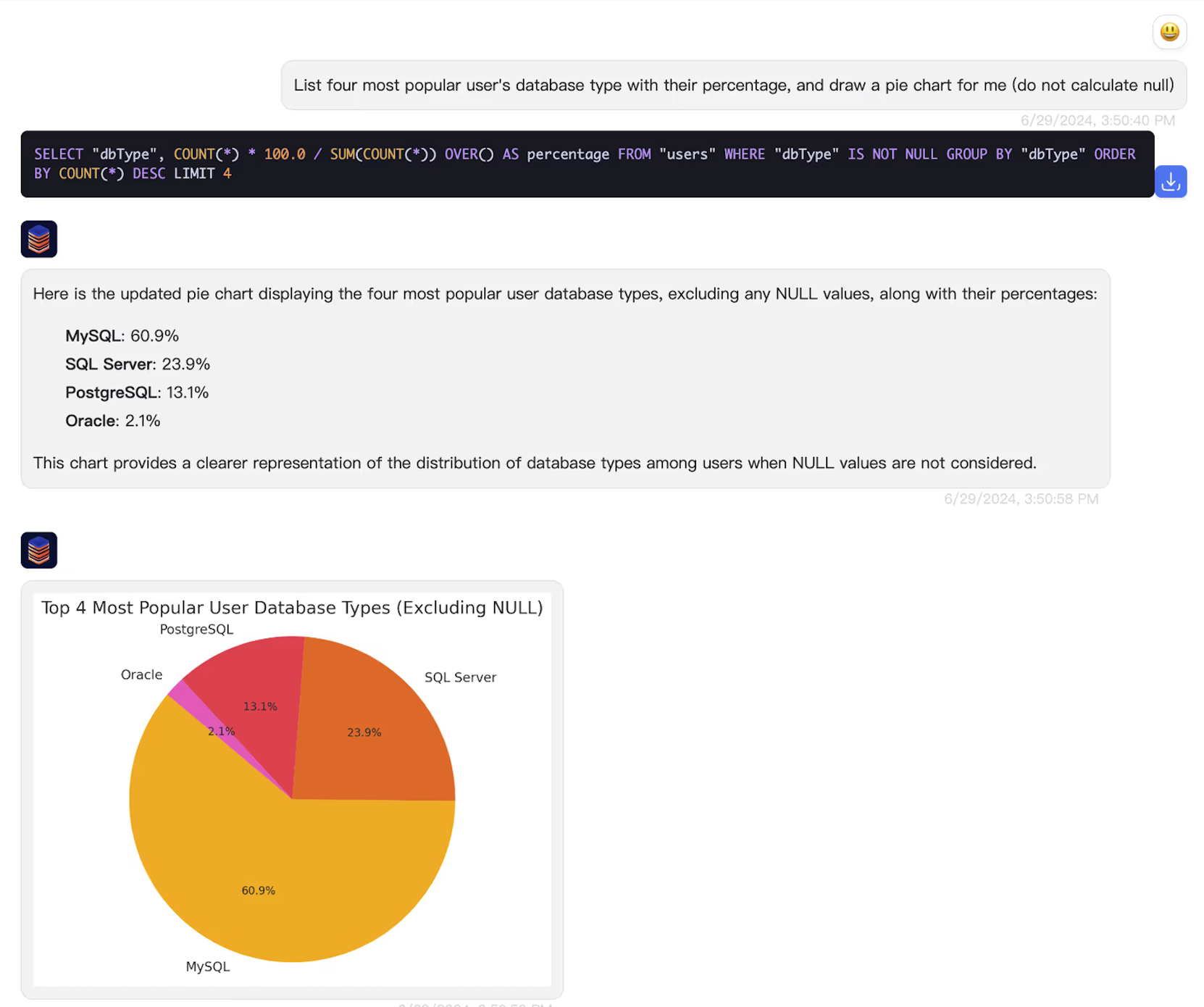
This existing product image illustrates the AskYourDatabase interface. It does not show execution of the synthetic fulfillment report. The hosted interface includes a CSV-download control for supported tabular result links; test it with your actual values and result size. Do not infer that a preview, a chart or a generated response proves complete export support in every product version.
For an individual analyst, start with Desktop and review plans. For a customer-facing workflow, use the embedded chatbot guide. Confirm export formats, dashboard availability and delivery requirements before selecting a plan. Review data flow and retention: local database execution does not guarantee local model processing, and downloaded files have their own access and retention requirements.
Export a reviewed result with PostgreSQL tooling
If your required deliverable is a CSV table, a database operator can use PostgreSQL's documented psql \copy command. This is a separate native PostgreSQL workflow, not a command to paste into an AYD chat.
After running the reference SQL, enter this on one line in the same psql session:
\copy (SELECT * FROM overdue_report ORDER BY days_overdue DESC, order_id) TO 'overdue-orders-2026-10-14.csv' WITH (FORMAT csv, HEADER true, ENCODING 'UTF8', NULL '\N')
\copy writes through the client, while a server-side COPY ... TO 'filename' addresses the database server's filesystem and has different permissions. Review the COPY documentation before adapting this. Confirm the output directory and use a unique filename to avoid overwriting another report. Our local check executed the SQL in PGlite, not this native psql export command.
For production reporting, use an approved query/view and a reporting identity. If preview and export are separate statements against changing tables, agree a consistent snapshot strategy with the database owner. A displayed cutoff date does not freeze the data. Record the source snapshot or extraction time alongside the business cutoff so the recipient knows what the report represents.
Accept the file, not just the preview
Use these checks on the actual output from whichever tool you choose:
| Check | Acceptance on this reference | Failure it catches |
|---|---|---|
| Parse the whole file | Six columns and three data records | Truncation, pagination-only export or malformed delimiters |
| Preserve the identifier | 000101, 000103, 000105 remain text | Spreadsheet removal of leading zeros |
| Reconcile the values | 10 units; maximum delay 6; no duplicated order | Join expansion or a different query scope |
| Preserve text fields | Comma and quotation mark stay inside their notes | Incorrect CSV escaping |
| Define empty values | The chosen \N marker represents SQL NULL | Confusion between unknown and empty string |
| Keep scope and freshness | Tenant A and the agreed cutoff/source snapshot | Wrong audience or stale/reexecuted data |
Count parsed CSV records rather than newline characters: a quoted field can contain a line break. Import order IDs as text rather than opening the file with automatic type inference. CSV quoting protects the file structure, but it does not neutralize spreadsheet formulas in untrusted text; establish an import/export policy for values beginning with formula characters.
Test zero-row and large-result cases too. An empty report should have a defined schema and a clear successful-empty status. A query error, denied download or partial file must not be treated as “no overdue orders.” For recurring delivery, additionally test failure alerts, duplicate sends, recipient authorization and retention. Those checks define the reporting system you need; they are not features established by this article.
The right next step is a small evaluation: choose the output, run a known-answer report and inspect the received artifact. Use conversational AI to reduce the work of exploring and refining the question, while keeping report acceptance tied to observable results.
Frequently asked questions
What is a PostgreSQL report generator?
A PostgreSQL report generator turns selected database rows into a usable report: a table, file, dashboard or formatted document. Choose it by the required output, access rules and delivery process, not only by whether it can generate SQL.
Can I generate PostgreSQL reports without writing SQL?
AskYourDatabase supports conversational queries against a connected PostgreSQL database. A database owner still needs to prepare access and explain the data. Validate the generated result and the actual export workflow before using the report for decisions.
Is a CSV export the same as an Excel or PDF report?
No. CSV carries tabular values, without workbook formatting, multiple sheets or a print layout. A formatted workbook or PDF needs a separate rendering step or a report designer that supports the required output.
Can AskYourDatabase email my PostgreSQL report every week?
This guide does not establish a built-in scheduled email workflow. Confirm scheduling, attachment formats, recipients, retries and access controls for your product and plan. An interactive database connection or downloadable result alone does not verify delivery automation.
Why does an exported report disagree with the screen?
Check whether the export includes all filtered rows or only a preview, whether the query reran against newer data, and whether the receiving application changed identifiers, dates or numbers. Compare row counts and control totals from the same result snapshot.
Does the reference prove AI accuracy or export reliability?
No. The downloadable SQL is a synthetic PostgreSQL reference checked locally in PGlite. It does not test an AI answer, a production database, a native psql export or the hosted AskYourDatabase download path.