Embedded AI Assistants: User Roles and App Context
Pass trusted user roles and validated screen context to an embedded AI assistant. Work through account boundaries, date filters, tab conflicts and acceptance tests.

An embedded AI assistant can use a user's role and current screen by combining server-verified identity with validated application context. Identity determines which data the user may access. Screen context explains the question: the selected account, reporting period, metric or page. A page filter may narrow an answer; it must never grant access to another customer's data.
This guide is for developers implementing context inside an existing application. For the broader architecture, interface and build-versus-buy decision, start with how to embed an AI database chatbot. Here, the deliverable is a context contract with known outputs and explicit update behavior.
AskYourDatabase publishes this guide. Product behavior was checked against its documentation and implementation on November 18, 2026. The downloadable example uses synthetic data and runs locally. It is not a completed security assessment, live integration test or AI accuracy benchmark.
Separate identity, authorization and screen state
A user opens a revenue page and asks, “Why did this change?” The assistant needs to know what “this” means. It also needs an independently enforced boundary around the records it can retrieve.
| Context category | Example | Authoritative source | What it controls |
|---|---|---|---|
| Authenticated identity | User Alice, account 17 | Your verified login and membership records | Who is making the request |
| Authorization | Approved account and reporting tables | Reviewed application and database policies | Which records and operations are permitted |
| Screen selection | Revenue page, October, USD | Browser selection validated by your backend | Which permitted data the question concerns |
| Business meaning | Paid orders, excluding cancellations | Reviewed metric definition | How the result should be calculated |
| Answer provenance | Period, scope and context revision | The actual request and result | What the displayed answer represents |
The browser can communicate a requested reporting period. It cannot appoint its user an administrator. Similarly, a URL containing accountId=29 is a request to select an account, not evidence of membership.
This distinction is shared across implementation approaches. Snowflake's embedded-context recipe treats page and persona information as context while keeping access controls separate. Holistics documents permissions for the current embed user. These are vendor-specific mechanisms; their payload fields are not interchangeable with AskYourDatabase's API.
Define a small context contract
For a first release, support one or two pages and a bounded date range. Pass stable identifiers instead of an entire browser DOM, application state object or arbitrary instructions.
A useful application-owned contract has two separate parts:
{
  "identity": { "accountId": 17, "role": "analyst" },
  "selection": {
    "page": "revenue",
    "start": "2026-10-01",
    "end": "2026-11-01",
    "metric": "paid revenue"
  }
}
This is an editorial contract, not an AskYourDatabase request body. The application derives identity from its authenticated session. It accepts only allowed selection keys, resolves the page to a known metric, validates real calendar dates and requires the exclusive end date to follow the start date. Document the business time zone before converting date selections into timestamps.
Reject unexpected identity or connection fields instead of merging the browser body into a trusted object. The OWASP authorization guidance recommends default denial and checking permissions on each request. In a real application, also apply its existing CSRF, rate-limit and session-expiration controls.
A runnable example with two accounts and two periods
Download context-contract.py and run it with Python 3. It needs only the standard library and creates an in-memory SQLite database:
python3 context-contract.py
The authored reference data contains these rows; all amounts are integer USD cents:
| Order | Account | Date | Status | Amount |
|---|---|---|---|---|
| A1 | 17 | October 5 | paid | 10000 |
| A2 | 17 | October 15 | paid | 2500 |
| A3 | 17 | October 20 | cancelled | 9000 |
| A4 | 17 | November 1 | paid | 7000 |
| B1 | 29 | October 7 | paid | 99000 |
Alice belongs to account 17; Bob belongs to account 29. For October, Alice's paid revenue is 12500 cents ($125) and Bob's is 99000 cents ($990). Alice's November result is 7000 cents ($70). The cancelled order and exclusive November 1 boundary explain why Alice's October total is neither 21500 nor 19500.
The reference query uses bound parameters:
SELECT COALESCE(SUM(amount_cents), 0)
FROM orders
WHERE account_id = ? AND status = 'paid'
  AND occurred_on >= ? AND occurred_on < ?;
The first parameter comes from trusted identity; the dates come from validated selection. This SQL demonstrates an application-owned reference calculation. It is not the product's row-policy syntax, a database row-level-security configuration or a claim that arbitrary generated SQL follows the same rules.
The script checks six expected result/context conditions and rejects ten invalid inputs, including an unknown user, forged account, forged role, connection override, unsupported page, missing field and invalid date windows. An empty authorized September period returns zero. Missing identity is rejected; it is not converted to zero revenue.
The test also preserves Alice's October context after building a November request. That is the intended behavior for independent request snapshots in this example. The hosted chatbot's customer-property behavior described below is different and must be evaluated explicitly.
Connect trusted context to AskYourDatabase
For AskYourDatabase Website Chatbot, your backend creates an authorized session using POST /api/chatbot/v2/session. The documented request accepts chatbotid, name, email, optional properties, and optional databaseConfig. Follow the embedding API guide for the returned URL and iframe flow.
After verifying the application user, construct a request from trusted values:
// Server-side excerpt. These values come from your authenticated application.
const body = {
  chatbotid: configuredBotId,
  name: verifiedUser.name,
  email: verifiedUser.email,
  properties: {
    accountId: verifiedMembership.accountId,
    role: verifiedMembership.role,
  },
};
Keep the API key in the backend Authorization header. Do not accept these values through an unrestricted spread of client input. Do not put a session callback URL in analytics, screenshots or public logs; it is an access artifact.
Configure context variables and row-level policies for the relevant reporting tables. For a positive integer account identifier, the documented template style can express:
SELECT * FROM orders WHERE account_id = {accountId}
Validate that identifier on the server before passing it. Template substitution is not the same as the bound parameters in the Python example. Do not interpolate free-form browser strings into policy SQL. A supplied role does not automatically create permissions: define the intended rule and test it. Restrict the source database account or approved reporting views independently, and cover related tables, joins, aggregates and exports.
For a separate database per customer, resolve the approved connection on your backend using database switching. Multi-database connectivity does not establish cross-database joins, automatic tenancy or safe browser-controlled routing.
Add metric meaning and test the actual user path
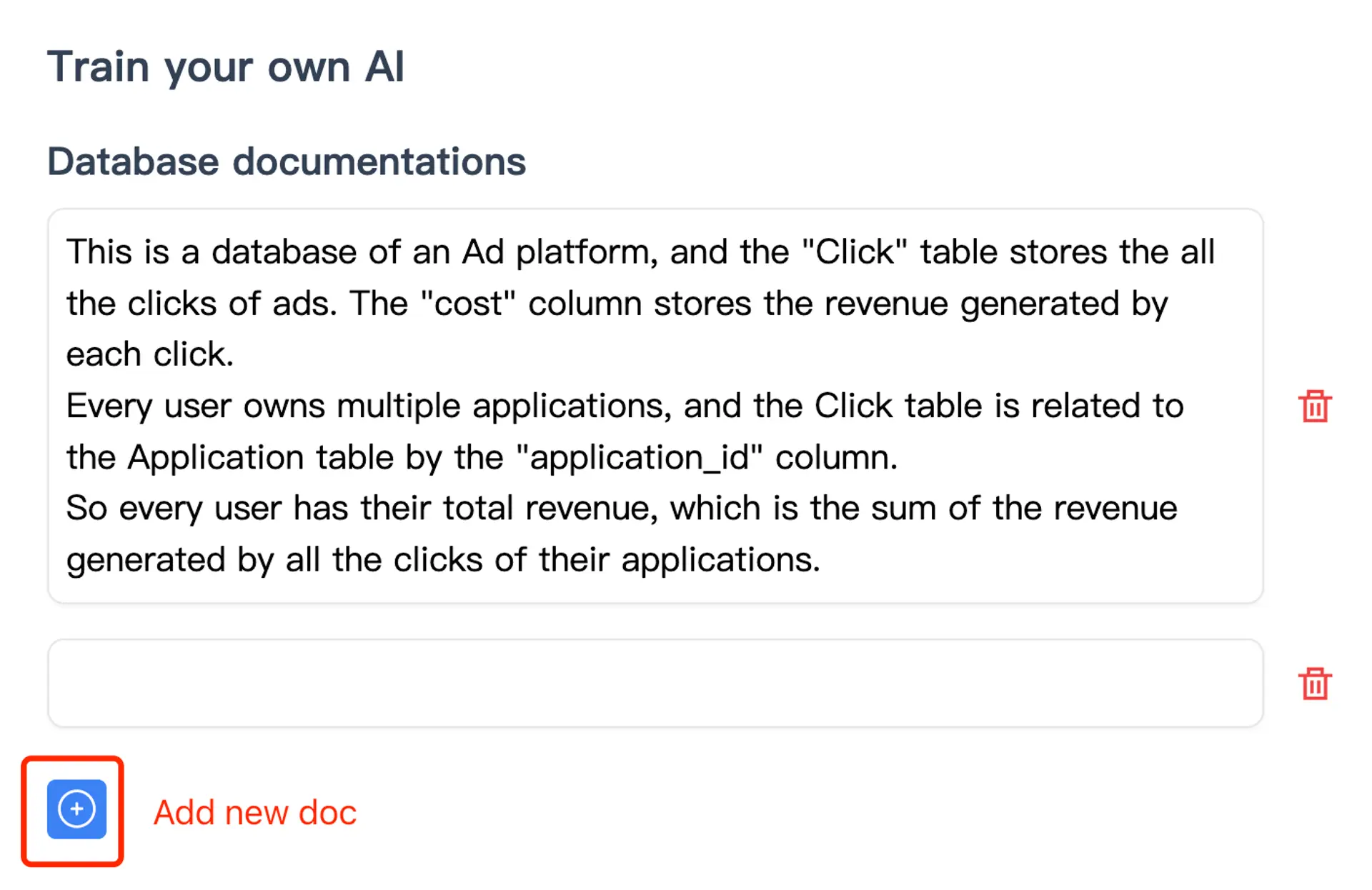
In AskYourDatabase, training documentation and SQL examples can supply the meaning of paid revenue and known reference queries. The product screenshot below shows its training interface; it is not output from the synthetic account example.
Use the Access Control debug panel to check mock identities, then repeat the cases through actual authenticated user sessions. A successful mock-context test does not verify your application's login or membership lookup. Keep model-processing and retention choices in the security review, since context may be included in AI requests.
Decide how context changes between questions and tabs
A stable account membership and a rapidly changing chart filter have different lifetimes. Decide where each lives before connecting the interface.
In the implementation reviewed for this guide, creating a hosted chatbot session updates the customer identified by chatbot plus email, including its properties. The hosted chat path reads those customer properties again. Do not assume that properties are a frozen snapshot for each session, conversation or browser tab. Creating a new chat does not by itself separate that customer record.
Consequently, repeatedly writing selectedMonth into customer properties from two open tabs can produce a context conflict. A tab showing October may ask its next question after another tab changed the shared value to November. This is a correctness and lifecycle issue even when both answers remain within the same account.
Choose and verify one of these approaches:
| Requirement | Implementation direction | Acceptance evidence |
|---|---|---|
| Stable account context with a standard embedded chat | Keep customer properties focused on reviewed identity; ask explicit period/metric questions | Actual user sees the expected account and declared period |
| A controlled single-view workflow | Validate each context change and serialize the supported update flow | An answer uses the scope shown when its request started |
| Independent context for multiple views or tabs | Evaluate an application-owned per-request integration using the conversational analytics API guide | Each request, conversation and response remains associated with its own validated context |
Do not manufacture email identities to work around lifecycle requirements. Agree a supported identity and conversation model, especially if one person can switch organizations. A new iframe or new chat is not proof that older sessions have been revoked.
For an account switch or role downgrade, verify the application's authorization again and review existing iframe sessions, conversation history and downloadable outputs. Record how access is withdrawn and test it in staging. Do not label revocation “instant” without an observed result from the deployed path.
Run an acceptance review before rollout
Use the editable acceptance worksheet to record the expected result, actual result and responsible owner. It includes raw rows, totals, invalid inputs, multi-tab changes, logout and follow-up questions.
- Run the same October question as Alice and Bob; verify the separate row sets and totals.
- Try to submit another account ID or administrator role from the browser; the application must reject the attempt.
- Ask for all accounts, then try a join, aggregate, export and follow-up. Inspect the effective data scope, not just the wording of a refusal.
- Open two periods in separate tabs and submit overlapping requests. Tie each answer to its request's declared period.
- Change membership or log out, then revisit the old iframe and history. Record the actual session and download behavior.
- Distinguish a permitted empty result from failed authorization or query execution. Make the output state clear to the user.
For retained evidence, use the AI analytics audit-log checklist. For answer correctness across many questions, use the text-to-SQL evaluation kit. Neither substitutes for testing the real authorization path.
Start a product evaluation with one reporting surface, two synthetic users and the worksheet. Review the embedded analytics product and plans; bring account-switching, independent-tab or private-deployment requirements to the team before committing to a configuration. The useful milestone is a demonstrated identity-to-answer path with clear scope, not an iframe that merely loads.
Frequently asked questions
How can an embedded AI assistant use the current user's role and application context?
Resolve identity and permissions from the authenticated application session, validate the selected page and reporting filters, and pass only the required context through a supported server-side integration. Enforce data access separately and make the answer's scope visible to the user.
Does passing a role in context enforce database permissions?
No. A role label is data until an authorization rule uses it. Keep role assignment server-side, configure the appropriate row-level policies or database routing, restrict source permissions, and test the actual execution path.
Can AskYourDatabase receive custom user properties?
Yes. Its server-side v2 chatbot session endpoint accepts a properties object. Context variables can be used in configured row-level policies and relevant AI context. Keep API keys and trusted identity fields on your backend.
Are chatbot properties isolated to a browser tab?
Do not assume so. In the implementation reviewed for this guide, properties are updated on the customer record identified by chatbot and email and are read again by the hosted chat path. Creating a new chat does not by itself create independent customer properties for each tab.
Can I put the current account ID in a browser request?
A browser selection may request an account switch, but your server must verify membership and derive the authorized account itself. Never copy a browser-provided account ID, role or database configuration directly into trusted chatbot context.
What does the downloadable context example prove?
It checks a local, synthetic context-mapping contract and parameterized SQLite reference totals. It makes no network or model calls and does not test AskYourDatabase sessions, row-level policy enforcement, revocation or production security.