
Natural Language Database Queries: SQL Examples & Guide
Learn how natural language database queries work, test SQL with a reproducible example, handle ambiguous questions, and connect your data to AskYourDatabase.
A natural language database query is a question such as “Which products earned the most revenue in August?” expressed in everyday language. An AI querying system connects that question to your tables and business definitions, generates a database query, and can return results for review. For a SQL database, that translation is usually called text-to-SQL.
The useful part is getting from a question to an answer you can verify. A fluent explanation alone does not establish that a revenue total is correct. This guide walks through a small reproducible SQL example, the information an AI assistant needs, and a practical AskYourDatabase setup and validation workflow.
What does a natural language querying tool do?
A querying tool bridges business language and stored data. It needs to know which tables exist, how they relate, what columns mean, and what the current user is allowed to access. Some tools generate SQL for you to copy; others connect to a database and support execution, results, charts, and follow-up questions.
| Approach | Input and output | Useful when |
|---|---|---|
| SQL generator | Question and schema → SQL text | You want to review and run a query in your own SQL client |
| Connected database assistant | Question → query → results and explanation | You need conversational exploration of live database data |
| Dashboard | Defined metrics and filters → repeatable views | Teams need the same approved numbers on a recurring basis |
| Document search | Question → relevant text passages | Answers live in manuals or policies rather than database rows |
These approaches can complement each other. For SQL generation and dialect examples, see our SQL query generator. If you are selecting an assistant, the AskYourDatabase and BlazeSQL comparison explains evaluation criteria. Customer-facing integration has a separate set of requirements covered by our embedded database chatbot implementation guide.
For ERP reporting, our guide to querying ERP data with AI applies this workflow to invoice and payment data, with a reproducible aging report, company boundaries, and synchronization checks.
How AI turns a question into a database query
A useful workflow has five stages:
- Understand the question. Identify the requested metric, grouping, filters, date range, and output size. Ask for clarification when “active,” “revenue,” or “recent” is undefined.
- Find the relevant schema. Select tables, columns, relationships, and permitted views. Similar column names do not prove that two tables should be joined.
- Apply business definitions. Choose the correct order statuses, refund treatment, currency, and reporting timezone.
- Generate and check the query. Use the database's SQL dialect and verify the query against access rules and resource limits before execution.
- Review the result. Compare a known total or sample records, then explain or visualize the result. Repeat the checks after a follow-up changes the scope.
This is an evaluation framework, not a claim that every AI product automatically implements every safeguard. Schema access alone cannot tell an assistant whether your business recognizes revenue when an order is paid, shipped, or invoiced.
A reproducible natural language to SQL example
Consider the question:
Which two products generated the most paid revenue during August 2026? Use quantity times unit price, exclude cancelled orders, and show revenue in USD.
The sample below uses three small tables. All orders in this example use USD; order_date is a calendar date, not a timestamp. Discounts, taxes, and refunds are deliberately outside this simplified model. These are invented sample rows for learning, not customer data or an AI accuracy benchmark.
| Table | Key columns | Meaning |
|---|---|---|
products | product_id, product_name | One row per product |
orders | order_id, order_date, status | One row per order |
order_items | order_id, product_id, quantity, unit_price | One row per order line; price at purchase |
This self-contained example uses common table expressions and runs in PostgreSQL. It does not create tables or modify stored data. Other engines may require different syntax for date literals, inline rows, or row limits.
WITH products(product_id, product_name) AS (
  VALUES (1, 'Notebook'), (2, 'Pen'), (3, 'Bag')
), orders(order_id, order_date, status) AS (
  VALUES
    (101, DATE '2026-08-01', 'paid'),
    (102, DATE '2026-08-31', 'paid'),
    (103, DATE '2026-08-15', 'cancelled'),
    (104, DATE '2026-09-01', 'paid')
), order_items(order_id, product_id, quantity, unit_price) AS (
  VALUES
    (101, 1, 2, 10.00),
    (101, 2, 3, 2.00),
    (102, 1, 1, 10.00),
    (102, 3, 1, 25.00),
    (103, 3, 10, 25.00),
    (104, 1, 100, 10.00)
)
SELECT
  p.product_id,
  p.product_name,
  SUM(oi.quantity * oi.unit_price) AS paid_revenue_usd
FROM orders o
JOIN order_items oi ON oi.order_id = o.order_id
JOIN products p ON p.product_id = oi.product_id
WHERE o.status = 'paid'
  AND o.order_date >= DATE '2026-08-01'
  AND o.order_date < DATE '2026-09-01'
GROUP BY p.product_id, p.product_name
ORDER BY paid_revenue_usd DESC, p.product_id
LIMIT 2;
Expected output:
| product_id | product_name | paid_revenue_usd |
|---|---|---|
| 1 | Notebook | 30.00 |
| 3 | Bag | 25.00 |
You can verify the result without trusting an AI answer: Notebook contributes 2 × 10 + 1 × 10 = 30; Bag contributes 1 × 25 = 25. Pen contributes 3 × 2 = 6 and falls outside the top two. The cancelled order and September order contribute nothing. Across all three products, August paid revenue is 61.00, not 55.00; 55.00 is only the top-two subtotal.
The half-open date interval includes August and excludes September. For real timestamp columns, define the reporting timezone before constructing boundaries. Grouping by the product ID as well as its name prevents two different products with the same display name from being merged. The second sort key makes tied totals deterministic.
For aggregate behavior, see the PostgreSQL aggregate-function reference. In particular, COUNT(*) and COUNT(column) treat nulls differently, and SUM over no matching rows returns null rather than a numeric zero. Decide what those outcomes mean for your report.
Write questions that specify the answer you need
You do not need to reproduce SQL syntax in your prompt. You do need to supply the business meaning that is missing from the schema.
| Ambiguous question | More useful question | Definition to supply |
|---|---|---|
| “What was revenue last month?” | “Sum paid order-line revenue for August 2026 in USD, excluding cancelled orders.” | Status, date field, currency, refunds and discounts |
| “How many active customers?” | “Count distinct customers with at least one paid order in August 2026.” | What counts as activity and how to deduplicate customers |
| “Who stopped buying?” | “List customers with a paid order before August 1 and none during August.” | Historical population and inactivity interval |
| “Show the best products.” | “Rank products by paid revenue, show the top two, and include the date range.” | Ranking metric, tie handling and row limit |
Follow-ups also need consistent scope. After the example, “Now include all products” should remove the limit while keeping the paid-status and August filters. “Break that down by region” requires a region field and a documented relationship; our sample schema has neither. A good response identifies the missing data instead of inventing a column.
For a reusable context brief and an active-user example with checked follow-up results, see how to query a database using AI. It distinguishes schema relationships from business definitions and shows how to retain filters between questions.
How to query your database using AskYourDatabase
AskYourDatabase provides a connected conversational workflow for supported databases including PostgreSQL, MySQL, SQL Server, BigQuery, and Snowflake. This section describes product usage; the earlier sample query is independent of the product. For warehouse-specific setup, the BigQuery chatbot guide covers job permissions, query costs and nested-array validation.
For Snowflake, the chatbot setup and answer-validation guide covers connection roles, authentication and selecting the latest order version before calculating revenue.
1. Prepare a small, permitted dataset
Start with a reporting view or sample database and an account restricted to the data you intend to expose. Have the database owner configure read access, network connectivity, and appropriate query limits. Read-only access reduces write risk, but does not prevent a large query from consuming resources or revealing data the account can read.
Use the database connection instructions for your connector, or follow the PostgreSQL chatbot setup and validation guide, including a reproducible time-zone and missing-day example. For Microsoft databases, the SQL Server chatbot guide covers schema visibility and top-N tie handling. Avoid placing database passwords in questions or public examples.
2. Connect Desktop and document your metric
The Desktop setup guide covers installation and connection preparation. Before asking a revenue question, provide concise documentation of the relevant status values, join keys, date field, currency, and exclusions. Add a reviewed question-and-SQL pair through the training workflow when the intended calculation is difficult to infer.
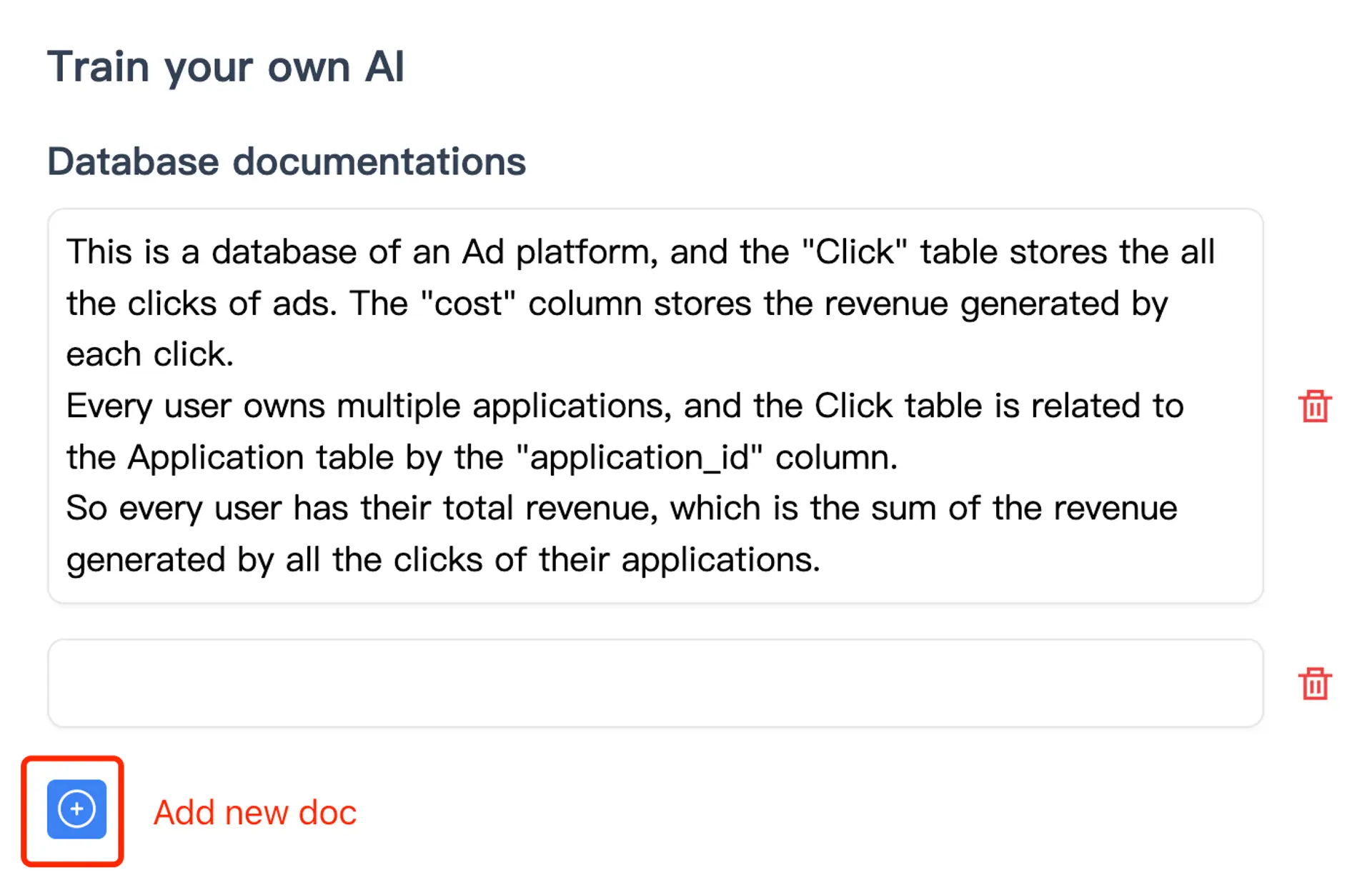
The training documentation explains documentation and SQL examples. Supplying context is not the same as proving correctness or guaranteeing that a model learns every business rule permanently. Validate the answer after changing the examples or schema.
3. Ask a question with a known answer
Choose a total your team can independently reproduce. Request the date range, filters, generated SQL, and result. If the answer differs from your reference, inspect the metric definition and joins before assuming a syntax repair will solve it. The query-quality tips explain how schema comments and feedback can help.
4. Check a follow-up and then visualize
Ask for the same result with a different grouping or limit. Verify that unchanged filters remain in place. Once the numbers agree, request a chart and check its units, ordering, and whether it shows all categories or a limited subset. A polished chart does not validate its underlying query.
For team access, website embedding, and deployment options, compare the Desktop, Website Chatbot, and Enterprise plans. If you need customer-facing access, use the embedded analytics chatbot evaluation page to review identity and tenant-isolation requirements.
For a repeatable report, follow the SQL dashboard worked example: reconcile KPI cards, a daily chart and a regional table under the same filters before sharing.
Validate meaning, access, and query cost separately
A query can execute successfully and still be wrong. Use a small acceptance checklist before relying on an assistant for reporting:
| Test | What to check | Example failure |
|---|---|---|
| Known answer | Compare generated results against a reviewed reference | Revenue includes cancelled orders |
| Join cardinality | Check row counts before and after joins | Joining a multi-row payment table duplicates order lines |
| Empty or missing data | Decide how nulls and no matching rows should appear | No rows reported as a confident zero without explanation |
| Date boundaries | Test the first and last included instants | The last day is excluded or next month leaks in |
| Follow-up scope | Recheck date, status and permissions after each change | “By region” silently removes the date filter |
| Permissions | Try requests for data outside the intended audience | A restricted user receives another tenant's records |
| Query cost | Review plans and resource limits with the database owner | A small result scans a large warehouse table |
For a reusable fixture, expected answers and a blank scorecard, use the text-to-SQL acceptance test kit. Record each question, the approved interpretation, expected result, actual result, and failure reason. Include paraphrases and deliberately underspecified requests. A pass rate from this small dataset describes only that test set; it is not a universal accuracy percentage. Microsoft's data-agent example-query guidance similarly treats question/query examples as something to validate and refine.
For MySQL-specific connection checks, date handling and a sales/refunds reconciliation example, continue with the MySQL AI chatbot setup guide.
Where does the data go?
Connection location and AI-processing location are separate decisions. In the standard AskYourDatabase Desktop workflow, the application connects to your database and executes SQL locally, while cloud AI services process the context needed to generate and explain answers. Relevant context and result data may leave the machine for that processing.
Review the security documentation and your intended configuration before connecting sensitive data. An installed Desktop application does not by itself mean offline inference. For private infrastructure requirements, use the private deployment decision table and acceptance checks to compare external versus self-hosted inference, map storage and network paths, and agree operational responsibilities.
Before inviting a business team, use the natural language query readiness guide to assign metric and access owners, map AI processing, and record a worked invoice acceptance test.
Permissions should be enforced by configured database and application controls. A prompt saying “only show my data” is not an access-control boundary. For customer-facing deployment details, continue with the embedded chatbot guide linked above.
Frequently asked questions
What is a natural language database query?
A natural language database query expresses a data question in everyday language. A system maps the question to schema and business definitions, generates a database query, and may execute it to return results.
How is natural language querying different from text-to-SQL?
Text-to-SQL produces SQL from a question. A natural language querying workflow can also execute the query, explain results, create visualizations, and maintain context for follow-up questions. Capabilities depend on the tool and configuration.
Do I need SQL knowledge to query a database with AI?
You can ask questions without writing SQL in AskYourDatabase. A database owner should still configure access and validate important metrics, joins, and generated results before relying on them.
Can natural language queries work with PostgreSQL and MySQL?
Yes. AskYourDatabase supports PostgreSQL and MySQL connections, along with other database types. Connector setup and SQL syntax differ by engine; a query written for one dialect may need changes for another.
Why can an AI-generated SQL query return the wrong answer?
Valid SQL can still use the wrong revenue definition, duplicate rows through a join, choose the wrong timezone, or omit a filter. Compare results with known answers and document the business rules needed to interpret the schema.
Does the Desktop app keep all AI processing offline?
No. Desktop connects to the database and executes SQL locally, but the standard AI workflow uses cloud AI services. Review what context and result data may be processed before connecting sensitive data, and discuss private deployment requirements separately.
Start with one question whose answer you already know. Prepare your Desktop connection, document the metric, and compare the result before expanding access or reporting scope.
Choosing an implementation
If you are comparing ready-made products with developer frameworks or SQL clients, the AskYourDatabase alternatives guide explains the workflow boundaries, operating costs, and a common acceptance scorecard. Keep your business definitions and known-answer tests consistent across candidates.